Icon Tools in 2026: Architecture Rules for Agent Actions, Permissions, and Audit

Teams ship icon tools because the interface needs a clean way to expose actions. A calendar icon schedules. A payment icon charges. A document icon edits. The UI looks simple, so the implementation gets treated as a front-end detail.
That is where production systems get messy. The icon becomes a shortcut to an action, but nobody owns the contract behind that action. The agent invokes it, the plugin interprets it, the user assumes something else, and the audit trail only records the final side effect.
Teams think the problem is icon design. The real problem is action architecture.
In 2026, icon tools sit at the boundary between humans, AI agents, plugins, SDKs, hosted products, credentials, payments, and workflow engines. If you treat them as decorative assets, you get inconsistent permissions, vague logs, brittle integrations, and support tickets that require reading three systems to understand one click. The practical question is not what the icon looks like. It is what the icon is allowed to mean.
Table of contents
- Why icon tools are an architecture problem
- Icon tools should be treated as action contracts
- Define the minimum schema before the UI
- Build the runtime workflow around state
- Permissions and credentials are part of the tool
- Design registries for discovery not decoration
- Make audit and observability first class
- What breaks when icon tools are implemented badly
- What works in production
- Where logicsrc.com fits
Why icon tools are an architecture problem
The icon is only the visible handle
An icon tool is the visible handle for a capability. It is the small thing a user or agent can select, but the important part is everything behind it: identity, permission, input schema, state transition, external system call, result handling, and audit.
The mistake teams make is letting the icon define the tool. A design system says this icon means send. An SDK maps it to a function called sendMessage. A plugin maps it to an API call. A hosted product maps it to a workflow. Those are not automatically the same thing.
A useful way to think about it is this: the icon is a pointer, not the source of truth. It should point to a declared action contract that every runtime can inspect.
Practical rule: if two systems can render the same icon but disagree about the action behind it, you do not have an icon tool. You have a visual convention with production risk.
Why this matters more in agent systems
Classic UI icons mostly helped humans navigate software. AI agent systems change the risk profile. Agents do not interpret icons the way humans do. They need structured descriptions, constraints, examples, scopes, and failure semantics.
An agent deciding whether to use a tool needs to know whether the action is read-only, reversible, billable, delegated, destructive, or requires human approval. A platform architect needs to know whether the tool can run in a hosted environment, a local plugin, an MCP server, or a cross-product workflow.
That changes the conversation. Icon tools are no longer just usability affordances. They are interoperability surfaces.
The ownership question
The hard question is ownership. Who owns the meaning of an icon tool?
If the front-end team owns it, the contract tends to be shallow. If the model orchestration layer owns it, the user interface becomes inconsistent. If each plugin author owns it independently, the ecosystem fragments.
A better operating model is shared ownership: design owns visual consistency, platform owns schemas, security owns permission boundaries, and product owns workflow semantics. That sounds heavier than picking an icon from a library, but it prevents a small UI decision from becoming an ambiguous authority path.
Icon tools should be treated as action contracts
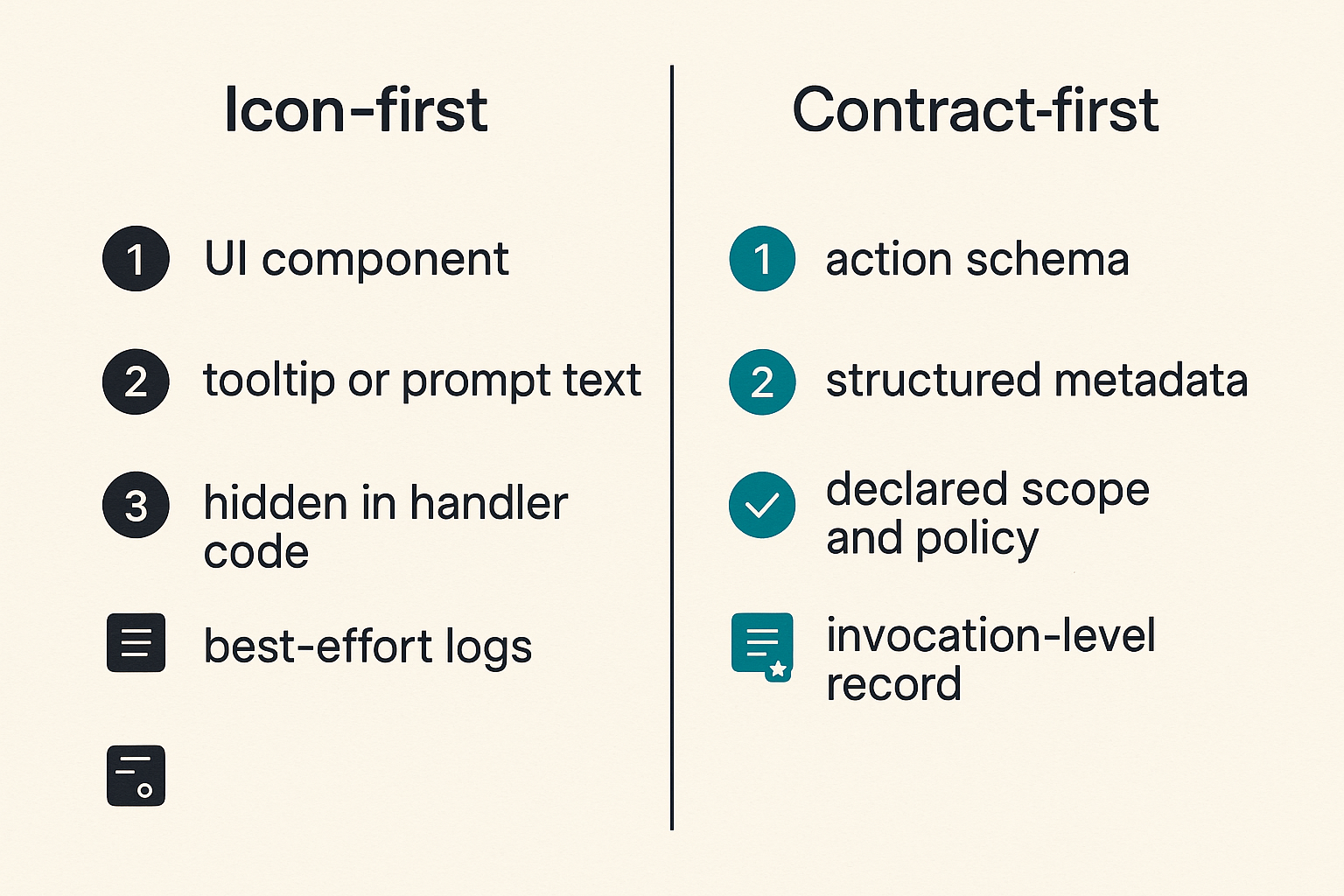
Wrong model versus right model
The wrong model is icon-first: choose an icon, attach a tooltip, wire it to a handler, and document the behavior later.
The right model is contract-first: define the action, its authority, its inputs, its outputs, its states, and its audit requirements. Then attach one or more icons to that action for different surfaces.
| Design choice | Icon-first approach | Contract-first approach |
|---|---|---|
| Source of truth | UI component | Action schema |
| Agent understanding | Tooltip or prompt text | Structured metadata |
| Permission model | Hidden in handler code | Declared scope and policy |
| Audit quality | Best-effort logs | Invocation-level record |
| Portability | Product-specific | Registry and version based |
| Failure handling | UI error message | Typed failure states |
The contract-first approach is not anti-design. It is how design stays safe when the same capability appears in chat, a plugin panel, an IDE, an admin console, and an autonomous workflow.
What the contract must declare
At minimum, an icon tool contract should declare:
tool_id: stable identifier, not a label.capability: what class of work the tool performs.display: icon, label, short description, and localization key.inputs: typed parameters with validation rules.outputs: typed result object or event reference.side_effects: read, write, send, charge, delete, publish, or similar.permission_scope: required user, agent, tenant, or workflow authority.approval_policy: whether human confirmation is required.audit_events: what must be recorded before and after invocation.failure_modes: typed errors the caller can handle.
Human-friendly labels still matter, but they cannot be the contract. A label like Approve may approve a draft, approve a payment, approve a credential grant, or approve a deployment. The verb is not enough.
Where open standards change the design
Open standards matter because icon tools often cross product boundaries. A tool that starts inside one hosted product may later need to run through an SDK, an MCP server, a browser extension, or an agent workspace.
If each system invents its own metadata, every integration becomes a custom adapter. If tools share a convention for identity, capability, credentials, events, and audit, then platforms can reason about them without knowing every vendor-specific implementation.
For adjacent workflow thinking, teams evaluating project tools face a similar sequencing problem: build the workflow before the surface. Related reading from our network: Asana project management software workflow architecture.
Define the minimum schema before the UI
Stable action identity
The first schema field should not be the icon name. It should be the action identity.
A stable action identity lets logs, policies, analytics, tests, and agents refer to the same capability over time. The identity should not change because the label changes from Send to Submit, or because the design system swaps an outline icon for a filled icon.
A practical format can be simple:
tool_id: com.example.invoice.approve.v1
capability: finance.invoice.approve
display:
  icon: check-circle
  label: Approve invoice
  description: Approve an invoice for payment after policy checks
This gives humans a readable display and gives systems a stable reference.
Inputs outputs and side effects
The contract should be honest about side effects. Many failures come from treating all tools like harmless UI interactions.
A read-only lookup and a payment release should not share the same execution path. A draft creation and an external publish event should not have the same approval policy. A tool that edits local state and a tool that sends data to a third party should be visibly different to the runtime.
Example schema fragment:
inputs:
  invoice_id:
    type: string
    required: true
  approval_note:
    type: string
    required: false
outputs:
  approval_event_id:
    type: string
side_effects:
  - write_internal_record
  - trigger_payment_queue
approval_policy:
  human_required: true
  reason: financial_action
The point is not to create ceremony. The point is to make risk visible before invocation.
Human readable labels are not enough
Labels are optimized for recognition. Contracts are optimized for execution. You need both.
The phrase Create ticket could mean create a support ticket, create a task, create an incident, or create a payment dispute. Humans resolve ambiguity from context. Agents need explicit constraints.
Practical rule: every icon tool label should be disposable. If changing the label breaks permissions, telemetry, tests, or integrations, the label is carrying architectural weight it should not carry.
A prior LogicSRC post makes the same point from a neighboring angle: icon tools should be designed as agent contracts rather than decorative UI. The implementation consequence is simple: put the schema first and let the icon reference it.
Build the runtime workflow around state
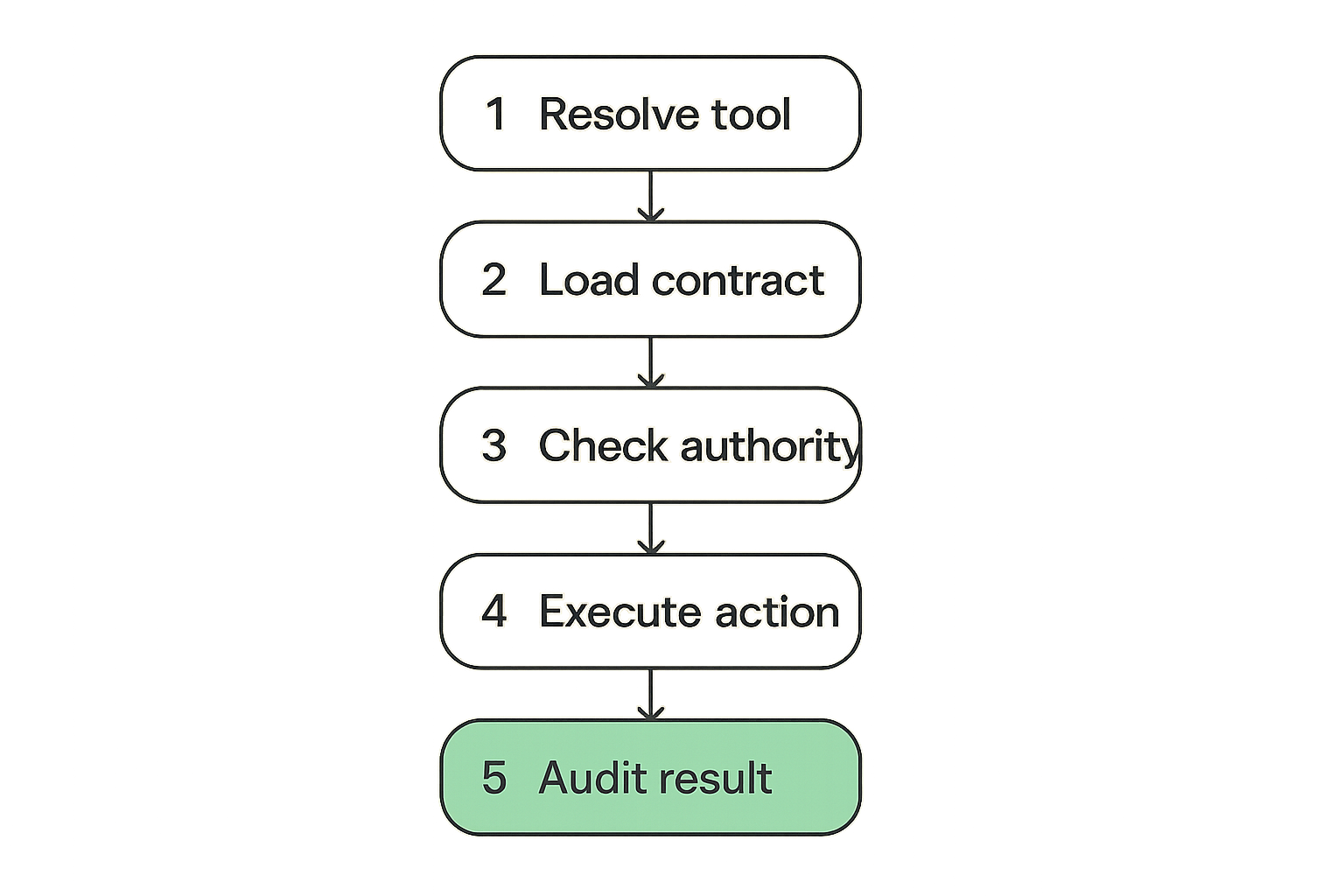
A practical invocation sequence
What breaks in practice is not usually the happy path. It is the half-completed action, the duplicate invocation, the missing approval, the stale credential, or the external API timeout.
A useful runtime workflow for icon tools looks like this:
- Resolve tool identity. The UI, agent, or plugin sends
tool_idand context, not just a click event. - Load the contract. The runtime fetches schema, permission requirements, side effects, and version.
- Check authority. User, agent, tenant, credential, and workflow policy are evaluated before execution.
- Validate inputs. Required fields, formats, limits, and contextual constraints are checked.
- Create an invocation record. Generate an idempotency key and write a pending audit event.
- Execute the action. Call the handler, plugin, MCP server, workflow engine, or external API.
- Persist result state. Store success, failure, cancellation, or pending external confirmation.
- Emit events. Notify observers, agents, humans, and downstream systems with typed events.
- Render outcome. Show result state using UI semantics that match the contract.
This is more than a button handler, but it is not overengineering. It is the minimum needed when a small icon can cause real work.
State transitions beat optimistic clicks
Many teams implement icon tools as immediate commands. Click, call function, show spinner, update UI. That works until the action crosses a boundary.
Agent workflows need explicit states:
availableselectedpending_inputpending_approvalauthorizedexecutingsucceededfailedcancelledrequires_repair
These states give agents and users a shared operational view. They also prevent accidental double execution. A tool in pending_approval should not look the same as a tool that is executing. A tool that failed policy checks should not look like a generic error.
Retries idempotency and cancellation
Retries are where weak tool design becomes expensive. If an agent retries a tool after a timeout, did the original action run? If a user closes the panel, should execution continue? If an external payment API returns late, which state wins?
Icon tools that cause side effects need idempotency keys and cancellation semantics. The invocation record should be durable before the external call. The result should be reconciled against that record, not inferred from the UI state.
The same concept appears in checkout systems, where the visible button is not the system of record. Related reading from our network: Walgreens coupon code workflow is consumer-focused, but the operational lesson is familiar: totals, exclusions, state, and confirmation matter more than the surface click.
Permissions and credentials are part of the tool
Permission scope must be explicit
An icon tool should declare its required scope in a way the runtime can evaluate. Do not bury permission checks inside handler code as the only enforcement point.
Useful scopes include:
- User role and tenant boundary.
- Agent identity and delegation level.
- Workflow step and approval status.
- Data classification.
- Credential type and expiration.
- External system authorization.
A destructive action should not become available because a prompt suggested it. A payment action should not run because an agent has generic workspace access. A credential-sharing action should not inherit authority from a UI session without a declared grant.
Credential sharing needs boundaries
Credential sharing is often where icon tools become risky. A tool may look like Upload, Sync, Send, or Connect, but behind the scenes it may expose credentials or allow an agent to act on behalf of a human.
The boundary should be explicit: what credential is used, who delegated it, what tool can use it, what data it can access, and when the grant expires. If your platform supports delegated access across agents and plugins, design the tool contract to reference that model directly. LogicSRC covers this surface in its work on credential sharing for agent and product coordination, where the important pattern is scoping authority instead of passing secrets around informally.
Practical rule: an icon tool that uses a credential should never be described only by what it does. It must also describe whose authority it uses and how that authority is constrained.
Delegation should expire
Agent systems make delegation normal. A user may ask an agent to prepare a report, send messages, create tickets, or approve routine tasks. That does not mean every future invocation should be authorized forever.
Tool contracts should support expiration by time, session, workflow, task, or approval event. The user experience can still be smooth, but the runtime should be skeptical. Long-lived delegation is convenient until a tool changes, a plugin is compromised, or an agent misinterprets context.
In practice, the contract should specify whether the tool can run autonomously, requires confirmation every time, or can run under a temporary grant.
Design registries for discovery not decoration
Registry entries need operational metadata
If you have more than a handful of icon tools, you need a registry. Not a folder of SVG files. A registry of capabilities.
A useful registry entry contains:
- Tool identity and version.
- Capability family.
- Display metadata.
- Supported runtimes.
- Required permissions.
- Input and output schema.
- Side-effect classification.
- Owner and support channel.
- Deprecation status.
- Test fixtures or example invocations.
This lets agents discover tools safely. It also lets platform teams answer basic questions: which tools can send external data, which tools require human approval, which tools use credentials, and which tools are still on deprecated versions.
Versioning must be boring
Versioning should be boring because boring versioning prevents incidents.
Do not change the meaning of approve_invoice.v1 in place. Add a new version when inputs, side effects, permission requirements, or output semantics change. You can keep the same icon across versions, but the contract version must remain inspectable.
A migration pattern might look like:
tool_id: com.example.invoice.approve.v2
replaces: com.example.invoice.approve.v1
compatibility:
  input_backward_compatible: false
  output_backward_compatible: true
migration:
  required_by: 2026-10-01
  fallback_allowed: false
The mistake teams make is assuming icons are timeless. Visual symbols may stay stable, but capabilities evolve.
Icons should map to capability families
Icons work best when they map to capability families rather than one-off product quirks. Search, summarize, approve, pay, export, connect, revoke, schedule, publish, and inspect are examples of families.
The family helps users and agents form expectations. The contract handles specifics. This separation matters when multiple products expose similar actions through different implementations.
A coordination-heavy ecosystem has the same issue local networks face: routing, ownership, trust, and follow-up matter more than a pretty directory. Related reading from our network: First Community operating model is not about AI tooling, but it frames the same coordination problem in another domain.
Make audit and observability first class
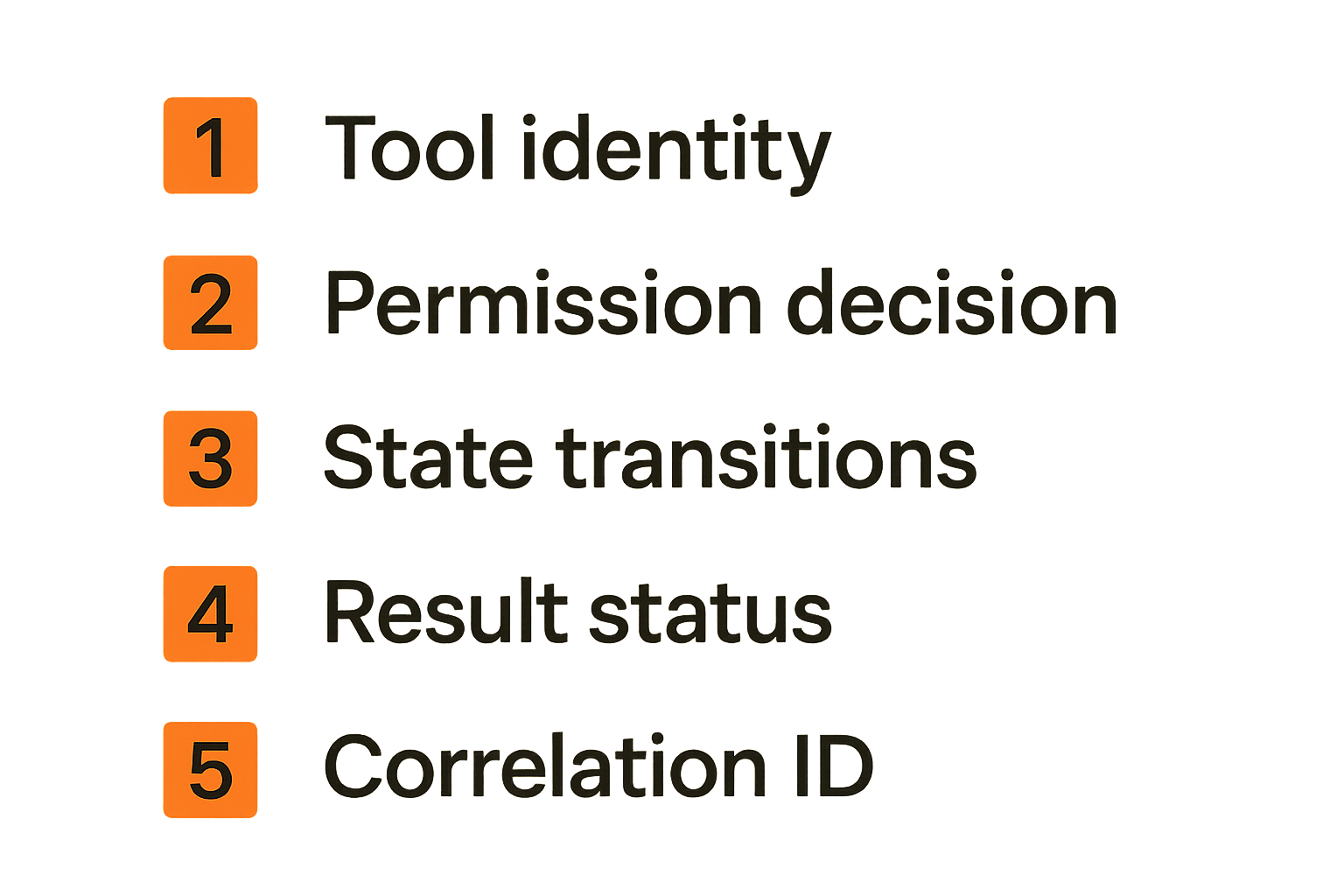
What to log for every icon tool invocation
Audit is not an afterthought. If an icon tool can trigger meaningful work, you need an invocation record.
Log at least:
- Invocation ID and idempotency key.
- Tool ID and version.
- User identity, agent identity, and tenant.
- Runtime surface, such as chat, IDE, plugin, or hosted UI.
- Input hash or redacted inputs.
- Permission decision and policy version.
- Credential reference, not secret value.
- State transitions with timestamps.
- External request reference if applicable.
- Result status and typed failure code.
This does not mean dumping sensitive payloads into logs. It means recording enough structure to reconstruct what happened.
Metrics that actually help operators
Icon tool metrics should answer operational questions, not vanity questions.
Useful metrics include:
| Metric | Why it matters |
|---|---|
| Invocation count by tool version | Shows adoption and migration risk |
| Policy denial rate | Reveals permission confusion or attempted misuse |
| Approval wait time | Shows workflow bottlenecks |
| Retry rate | Indicates handler or network instability |
| Duplicate suppression count | Confirms idempotency is doing work |
| Failure by typed error | Makes repair possible |
| Human override rate | Shows where agent autonomy is not trusted |
If the only metric is clicks, you are measuring the surface, not the system.
Validation closes the loop
Validation should happen before and after execution. Before execution, validate inputs and authority. After execution, validate that the expected state change occurred.
For example, if a tool says it approved an invoice, the system should verify the invoice state changed to approved, the approval event exists, and the payment queue received the expected message if that side effect is part of the contract.
Practical rule: a successful handler response is not proof of a successful tool invocation. Validate the business state the tool promised to change.
What breaks when icon tools are implemented badly
Ambiguous intent
Ambiguous intent is the most common failure. A user thinks an icon will draft. The agent thinks it will send. The plugin sends. The audit log says tool executed.
This is not a model problem only. It is a contract problem. If the tool metadata does not separate draft, preview, approve, and publish, the runtime cannot reliably enforce intent.
Ambiguity also hurts accessibility and localization. If the meaning is stored in a tooltip or prompt string, translation changes can alter operational expectations.
Permission drift
Permission drift happens when the UI, backend, plugin, and agent policy do not share one source of truth.
The UI hides a tool for one role. The API still allows it. The agent runtime has an old policy. A plugin caches credentials. The audit layer records only the final API call. Each piece looks reasonable alone. Together they create an authority gap.
The fix is not more scattered checks. The fix is a declared permission model tied to the tool contract and enforced at runtime.
Support cannot reconstruct events
Bad icon tools create bad support cases. A customer says the agent clicked the wrong thing. The front-end log shows a UI event. The backend log shows an API call. The plugin log shows a timeout. The workflow system shows a completed task. Nobody can connect them.
This is why invocation IDs matter. Every tool execution should carry a correlation reference from selection through policy, handler, external API, event emission, and final rendering.
Without that, your team is debugging stories instead of systems.
What works in production
Start with narrow tools
The best icon tools are often narrow. They do one job with clear authority and clear state.
A broad tool like Manage invoice is difficult for agents and users to reason about. Narrow tools like Preview invoice, Request approval, Approve invoice, Queue payment, and Revoke approval are easier to secure and audit.
Narrow does not mean cluttered. The UI can group related actions under one visual family. The contract should still keep the actions distinct.
Separate display from authority
Display changes frequently. Authority should not.
You may change icon style, label casing, placement, color, or grouping. Those changes should not affect tool_id, permission policy, audit semantics, or handler behavior. Treat display as metadata attached to an action contract.
A simple rule for reviews: if a pull request changes an icon asset, it should not be able to expand the tool scope. If it changes tool scope, it should go through platform and security review, not only design review.
Test the workflow not the SVG
You should still test rendering, accessibility, and layout. But the higher-value tests are workflow tests:
- Can an agent discover the tool and understand constraints?
- Does the runtime reject missing authority?
- Are required inputs validated before execution?
- Does idempotency suppress duplicate execution?
- Are pending approvals represented correctly?
- Are audit records complete enough for reconstruction?
- Does cancellation produce a terminal state?
- Does a deprecated tool version fail safely?
This is where open maintainers and developer tool builders can set ecosystem quality. Publish fixtures. Provide conformance tests. Make it easy for plugin authors to implement the contract correctly.
Where logicsrc.com fits
An open standards surface for agent coordination
LogicSRC is useful when icon tools need to coordinate across systems instead of living inside one product boundary. The site focuses on open schemas, primitives, and conventions for coordination between humans, AI agents, plugins, payment systems, events, credential sharing, MCP, and auditable workflows.
That matters because icon tools are exactly the kind of small surface that becomes expensive when every product defines it differently. If agents, plugins, and hosted products can share conventions for identity, events, permissions, and audit, then tool implementations become more portable and less surprising.
You can learn more about the broader standards surface on the LogicSRC about page.
When to use this approach
Use a contract-first approach for icon tools when any of these are true:
- An AI agent can invoke the tool.
- The tool crosses product, plugin, or runtime boundaries.
- The tool uses delegated credentials.
- The action has side effects beyond local UI state.
- Humans need an audit trail.
- The tool may be implemented by third-party developers.
- The icon appears in multiple surfaces with the same intended meaning.
If your icon only expands a local panel, a lightweight UI component is probably fine. If it sends data, changes business state, spends money, shares credentials, publishes content, or delegates authority, treat it as an action contract.
The closing point is simple: icon tools are not small because they are visually small. They are small only when the action behind them is narrow, declared, permissioned, observable, and testable.
Try logicsrc.com
logicsrc.com is for developers and platform teams building interoperable AI agent systems, SDKs, plugins, and hosted products. If you are turning icon tools into open action contracts, Try logicsrc.com.