Icon Tools in 2026: Build Them as Agent Contracts, Not Decorative UI

Your plugin catalog looks clean. The icons line up. The labels are short. Then an agent selects the wrong tool, asks for the wrong credential, or triggers a workflow nobody can explain afterward.
That is where icon tools stop being a design-system detail and become an architecture problem. In agent systems, the icon is often the first visible handle for a capability that can read data, spend money, move state, or coordinate with another service.
Teams think the problem is icon consistency. The real problem is action ambiguity.
In 2026, AI engineers and platform teams are wiring agents into SDKs, MCP servers, hosted products, credential flows, event streams, and payment rails. The practical question is not which icon pack to use. It is how to make icon tools carry enough identity, permission, state, and audit context that humans and agents can make safe decisions.
Table of contents
- Why icon tools became an architecture problem
- The contract an icon tool must carry
- Standards surface for icon tools, MCP, schemas, and events
- What breaks when icon tools are only UI assets
- A practical icon tool architecture
- What works when designing icon tools for agent workflows
- What fails in icon tool implementations
- Runtime policy and credential boundaries
- Measuring whether icon tools reduce confusion
- Product fit: where LogicSRC belongs
- Closing: make icon tools operational
Why icon tools became an architecture problem
The icon is the affordance agents can misread
In a normal SaaS product, an icon helps a user scan a menu. In an agent system, the same icon may represent a callable capability. It may be rendered in a human UI, described to a model, exposed through an SDK, indexed in a plugin registry, or referenced in a workflow transcript.
That changes the conversation. If the icon points to a tool that sends invoices, grants access, deletes records, opens a support case, or shares a credential, the icon is no longer decoration. It is part of the control plane.
The mistake teams make is assuming that a human-readable label is enough. It rarely is. Humans tolerate fuzzy wording. Agents amplify it. If two tools look similar, sound similar, and produce different side effects, the runtime needs more than a pretty glyph to disambiguate them.
Teams think the problem is design consistency
Design consistency matters, but it is not the hard part. You can standardize stroke widths, color tokens, and hover states while still shipping unsafe icon tools.
The real problem is semantic consistency. Does the icon mean read, write, approve, execute, delegate, or revoke? Does it apply to one record, a workspace, a customer account, or an external system? Can an agent infer whether the action is reversible? Is the user seeing the same meaning the model sees?
A useful way to think about it is this: the visual icon is the front door. The contract behind it is the building.
Practical rule: if an icon tool can cause a side effect, it needs a machine-readable contract that is stronger than the visual asset.
What changes in 2026
The agent stack is becoming more interoperable. Teams are connecting MCP servers, internal tools, external plugins, workflow engines, identity providers, and audit systems. Tool catalogs are no longer static menus inside one app. They are shared surfaces across products and runtimes.
This is why icon tools matter now. The icon may be rendered in one place, selected by an agent in another, authorized by a policy engine somewhere else, and later reviewed by compliance or support. If those systems do not share a common meaning, the workflow becomes brittle.
The practical question is: what contract should an icon tool expose so multiple systems can understand it without custom glue every time?
The contract an icon tool must carry
Identity before aesthetics
Every icon tool needs a stable identity. Not just a filename. Not just a CSS class. Not just a label like export or sync.
A stable identity should survive redesigns, localization, and packaging changes. It should be usable in logs, event streams, access policies, and test fixtures. In practice, that means an icon tool should have a canonical identifier such as tool.customer.export.v1, not only download.svg.
The identifier should answer a simple question: when this appears in a UI, prompt, or registry, what capability is being represented?
A minimal identity layer usually includes:
- canonical tool id
- provider or owner namespace
- version
- display label
- visual asset reference
- action category
- risk class
- lifecycle state
Without this, teams end up reverse-engineering meaning from labels. That works during a prototype. It fails in production.
Permission before invocation
An icon tool should never imply that visibility equals permission. Showing a tool, describing a tool, and authorizing a tool are separate operations.
This distinction matters for agent runtimes. An agent may need to know a tool exists without being allowed to invoke it. A user may be allowed to inspect a tool but not approve its execution. A workflow may allow read-only access during planning and require step-up approval before mutation.
The contract should expose permission requirements in a form that policy systems can consume. For example:
- required credential type
- allowed actor classes
- required scopes
- approval mode
- data sensitivity
- side-effect level
- reversibility
Practical rule: icon tools should be discoverable by intent, but invocable only through explicit authorization.
State before pixels
A static icon hides too much. In real workflows, tools have state. They may be available, unavailable, degraded, awaiting credential, pending approval, running, completed, failed, or revoked.
If that state is only represented by color or tooltip text, agents and assistive systems will miss it. State needs to be part of the contract.
A good icon tool contract separates the icon asset from the current runtime state. The same export tool can have one identity and multiple states. The runtime should be able to explain why a state applies:
- missing credential
- policy denied
- provider offline
- rate limited
- waiting for human approval
- disabled by administrator
- incompatible version
This is where icon tools become workflow primitives instead of UI tokens.
Standards surface for icon tools, MCP, schemas, and events
Map icon tools to action contracts
Open agent systems need shared conventions. The goal is not to force every product to use the same art style. The goal is to make the meaning behind a tool portable.
If an MCP server exposes a tool, a plugin registry describes it, and a hosted product renders it, all three should agree on the action contract. The icon should point to that contract, not replace it.
A contract can include a visual reference, but it should also include the action name, inputs, outputs, side effects, permission model, audit event type, and failure modes. For deeper treatment of this exact framing, the prior LogicSRC article on treating icon tools as action contracts is the closest adjacent read.
Keep visual labels aligned with machine-readable schemas
Machine-readable schemas are where ambiguity gets reduced. A label like share might mean share a link, share a credential, share a file, share a workspace, or share a customer record. The schema should make the object and effect explicit.
A useful icon tool schema should include fields like:
action.verb: create, read, update, delete, approve, revoke, delegateaction.object: file, credential, payment, event, ticket, workspaceaction.scope: personal, team, tenant, externaleffect.type: none, reversible, delayed, irreversibleauth.required: none, delegated, user, admin, multi-partyaudit.event: event name emitted after invocation
This is not taxonomy for its own sake. It prevents one product from calling an action connect while another calls the same action authorize and a third logs it as share. If your team is debating whether this is a spec, protocol, schema, contract, or convention, the LogicSRC post on synonyms of standards in AI agent systems is useful because those words create different implementation expectations.
Use events as the audit backbone
The icon tool contract should not stop at invocation. It should map to events.
When a user or agent invokes a tool, the system should emit a structured event that includes the tool id, actor, subject, target, credential context, policy decision, runtime state, input summary, output summary, and correlation id.
This gives downstream systems a way to reconstruct intent. It also gives product teams a way to debug tool confusion. If the same icon tool repeatedly triggers cancellations, denials, or support tickets, the issue may be semantic mismatch rather than model quality.
What breaks when icon tools are only UI assets
Ambiguous actions create unsafe automation
What breaks in practice is not usually one dramatic failure. It is a sequence of small mismatches.
A model sees two similar tools. One exports a filtered report. One exports all customer data. Both use the same download icon. The UI label is short. The prompt context is stale. The user approves because the tool looked familiar. Now support has to explain why the wrong dataset moved.
This is preventable. The contract should encode object scope, data sensitivity, and side-effect class. The runtime should expose that context before invocation, not after damage control.
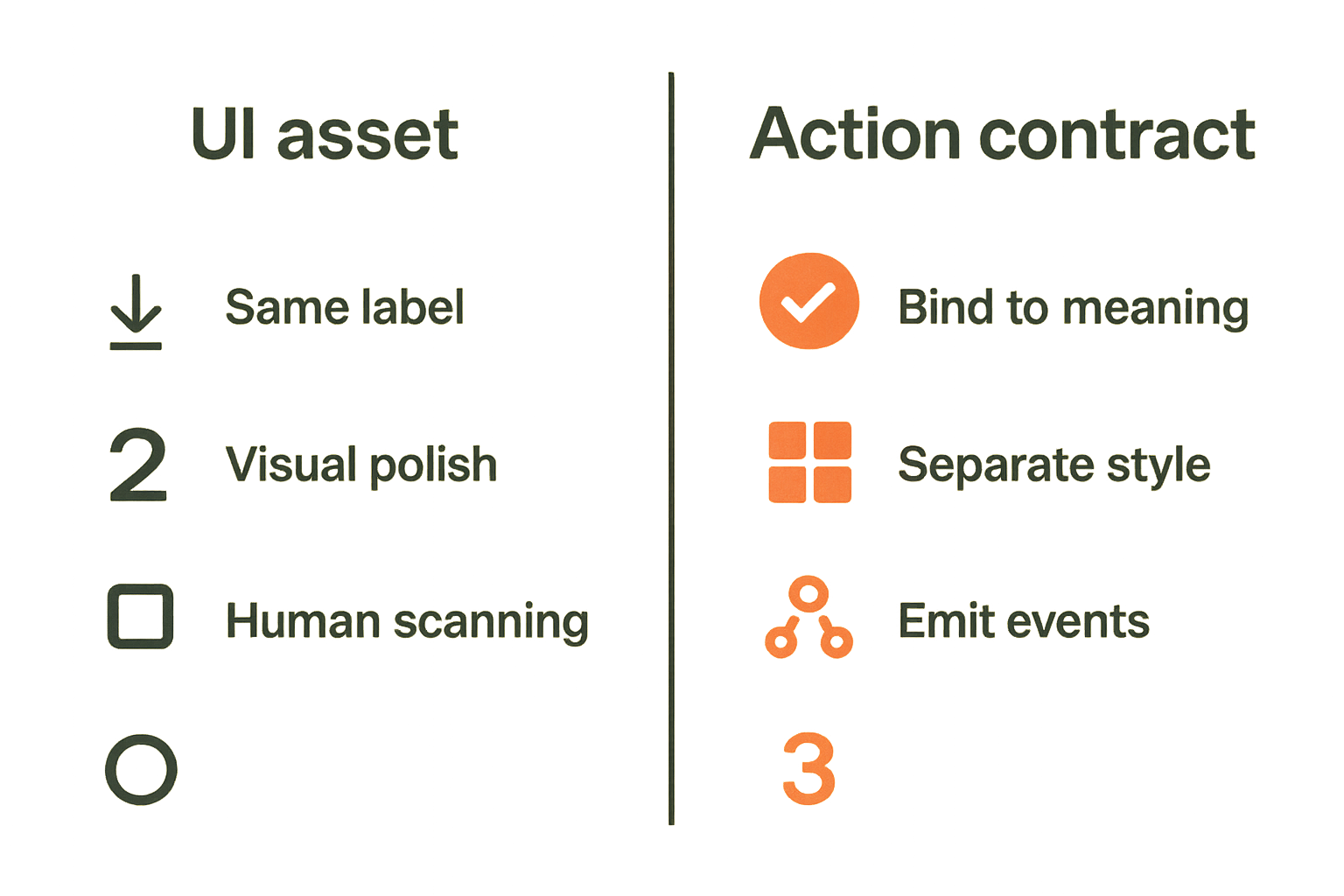
| Approach | What it optimizes | What breaks | Better pattern |
|---|---|---|---|
| Icon as asset | Fast UI assembly | Agents infer meaning from labels | Bind icon to action contract |
| Icon as brand element | Visual polish | Runtime cannot enforce semantics | Separate style from capability |
| Icon as tooltip | Human scanning | Logs lose intent | Emit structured events |
| Icon as contract | Interoperable action meaning | Requires governance | Version schema and policy |
Plugin catalogs drift from runtime behavior
Plugin catalogs age quickly. A tool gets renamed. A permission scope changes. A provider adds a destructive mode. The icon remains the same. Documentation lags.
If the icon catalog is disconnected from runtime contracts, discovery becomes unreliable. Agents plan with one meaning while execution uses another. Humans see a friendly icon while policy evaluates a different capability.
The fix is boring but important: generate catalog entries from the same source of truth used by runtime authorization and event emission. Do not maintain a design catalog, an SDK manifest, and a policy registry as separate hand-edited artifacts.
Auditors cannot reconstruct intent
Auditing agent workflows is hard when the record only says a generic tool was used. It is harder when the screenshot shows one thing, the logs show another, and the model transcript uses a third name.
Auditors need to know what was presented, what was selected, what was authorized, what executed, and what changed. Icon tools should participate in that chain.
Practical rule: if you cannot connect the rendered icon, the selected tool, the policy decision, and the emitted event, you do not have an auditable icon tool system.
A practical icon tool architecture
The minimum object model
You do not need a heavyweight standard body process to start. You need a disciplined object model that your UI, SDK, agent runtime, and policy layer can share.
A practical icon tool object might contain:
id: stable canonical identifiernamespace: owning product, plugin, or organizationversion: semantic version for meaning changesasset: SVG or icon token referencelabel: human-readable display labeldescription: short intent descriptionaction: verb, object, scope, side-effect classinputs: schema referenceoutputs: schema referenceauth: scopes, credential requirements, approval modestate: available, disabled, pending, degraded, revokedevents: planned, invoked, succeeded, failed, revokedrisk: sensitivity and reversibility metadata
The mistake teams make is trying to solve this entirely in the design system. The design system should consume this object, not own all of its meaning.
A reference workflow
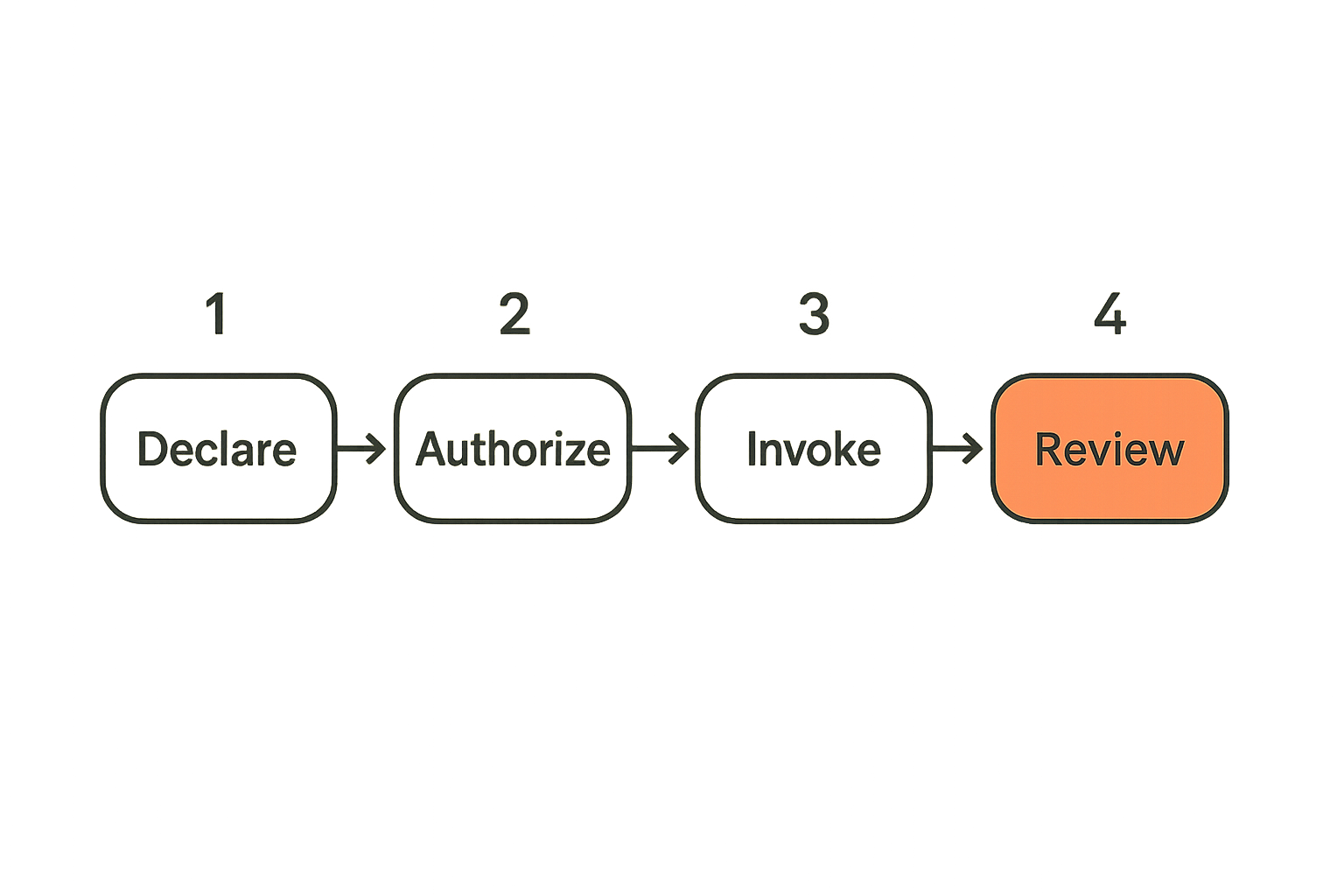
A workable implementation sequence looks like this:
- Define canonical tool ids and namespaces before choosing final icon art.
- Map each tool to an action contract with verb, object, scope, and side-effect class.
- Attach input and output schema references used by the actual runtime.
- Declare required credentials, scopes, approval modes, and policy hooks.
- Generate UI catalog entries from the contract, including label and state.
- Expose the same contract to agents through MCP, SDK manifests, or plugin metadata.
- Emit structured events for discovery, selection, authorization, invocation, completion, and failure.
- Review logs for confusion signals and version contracts when meaning changes.
This sequence keeps the icon from becoming an orphaned asset. It also gives maintainers a clean path for compatibility.
Where to put validation
Validation belongs at multiple layers.
At build time, validate that every icon tool has a stable id, version, action class, schema reference, and owner. At catalog publish time, validate that display labels and descriptions match the contract. At runtime, validate that the actor has the required authorization and that the state allows invocation. After execution, validate that emitted events match the declared event types.
Do not trust the UI to enforce this. Do not trust the agent prompt to enforce this. Put validation where bypasses are expensive.
What works when designing icon tools for agent workflows
Use verbs, scopes, and owners
What works is plain language backed by strict metadata. The human label can be concise, but the contract needs precision.
Instead of a vague tool called sync, define whether it is sync calendar events from external provider into workspace, sync workspace records to external CRM, or sync credential status from identity provider. Those are different actions with different risks.
Use owner namespaces to avoid collisions. crm.contact.export and billing.invoice.export may share an icon shape, but they should not share an identity.
Make disabled and pending states explicit
Disabled states are often treated as UI styling. In agent workflows, disabled means policy context.
A tool might be disabled because the user lacks a credential, the tenant disabled the integration, an admin approval is pending, the provider is in maintenance, or the action is blocked in the current workflow stage. Those reasons produce different next steps.
Agents need to know whether to ask for authorization, choose an alternative, wait, escalate, or stop. Humans need the same clarity.
Practical rule: never encode operational state only as a gray icon. State must be readable by humans, agents, and logs.
Version the meaning, not just the file
Icon file versioning is not enough. The meaning of a tool changes when its side effects, scopes, required credentials, object type, or audit semantics change.
If export used to mean export current view and now means export tenant dataset, that is a breaking semantic change even if the SVG did not move one pixel. Version the contract. Mark compatibility. Provide migration notes for agents and clients.
A useful pattern is to keep stable ids for compatible changes and introduce a new major version when risk or scope changes. This gives platform teams a way to deprecate safely instead of silently changing tool behavior.
What fails in icon tool implementations
Treating icons as CDN assets
A CDN asset can serve pixels. It cannot carry enough operational meaning by itself.
When icon tools are just URLs, every consuming system reinvents interpretation. The UI has one map. The SDK has another. The docs have a third. The agent prompt contains a stale summary. The policy engine sees only an endpoint.
This is how drift happens. The icon remains visually stable while the capability behind it changes.
Letting every plugin define its own semantics
Plugin ecosystems need flexibility, but unconstrained semantics create support debt. If every plugin defines share, connect, publish, approve, and revoke differently, agents cannot build reliable plans and users cannot build trust.
Open standards do not need to eliminate product-specific behavior. They need to standardize the minimal fields required for interoperability: identity, action class, permission requirements, state, and audit events.
The right balance is a small shared core plus extensibility. Make the common fields boring and strict. Let products extend where they genuinely differ.
Hiding risk behind friendly labels
Friendly labels are useful until they hide impact. A button that says tidy up but deletes records is a bad contract. A tool that says connect but grants ongoing delegated access is a bad contract. A wand icon that applies irreversible transformation without disclosing scope is a bad contract.
Risk should be visible in the UI and readable in the contract. If an action is irreversible, external, billable, or credential-bearing, the runtime should treat it differently from a read-only lookup.
Runtime policy and credential boundaries
Separate recognition from authorization
An agent can recognize a tool without being authorized to use it. That separation is important.
Recognition supports planning and explanation. Authorization supports execution. If you collapse them, you either hide too much during planning or expose too much during execution.
A good runtime can tell an agent: this tool exists, it would solve the task, but it requires user approval and a scoped credential. That lets the agent ask the right question instead of guessing.
Bind icon tools to credential-sharing rules
Credential boundaries are where icon tools become sensitive. A tool that reads public metadata is different from a tool that uses a delegated credential to act in another system.
The icon tool contract should reference credential-sharing rules directly. It should define what credential type is required, who can grant it, how long it lasts, whether it can be delegated, and what audit event is emitted when it is used. LogicSRC's work around credential sharing is relevant here because agent workflows often need credentials to be portable without becoming invisible.
This is not just security hygiene. It improves UX. When a tool is unavailable, the system can explain whether the missing piece is a credential, a scope, an approval, or a policy block.
Handle revocation and downgrade paths
Revocation is part of the tool lifecycle. A credential can be removed. A plugin can be suspended. A tenant can downgrade a plan. A provider can disable an action. An admin can block a risky integration.
The icon tool contract should support revoked and degraded states. It should also define what happens to in-flight workflows. Can they finish? Must they pause? Are they retried? Is a compensating action required?
Many teams design only the happy path. What breaks in practice is the half-authorized, half-executed workflow that nobody owns.
Measuring whether icon tools reduce confusion
Metrics that matter
You cannot improve icon tools if you only review screenshots. Measure workflow behavior.
Useful metrics include:
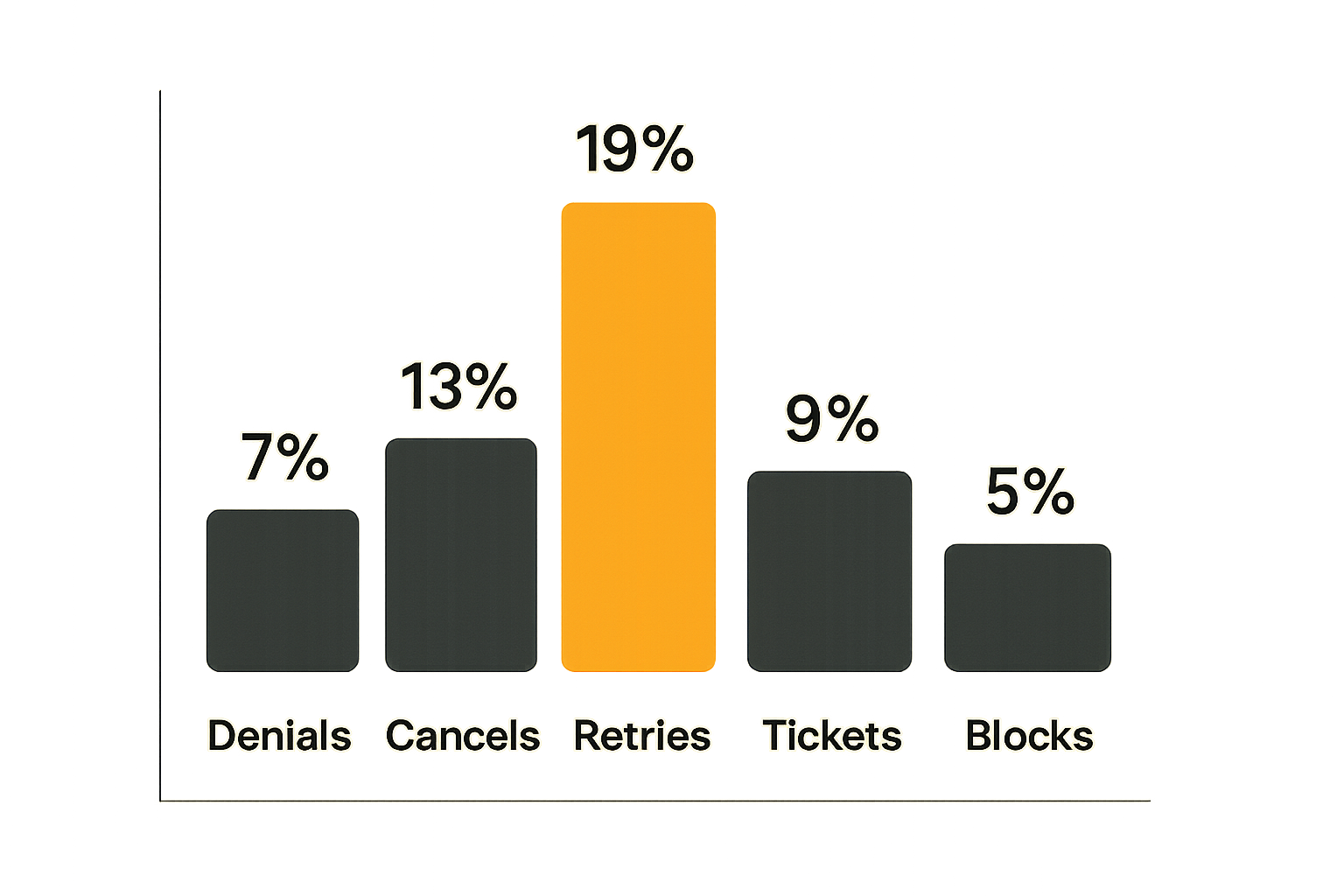
- tool selection reversals
- authorization denials after selection
- user cancellations at confirmation
- agent replans caused by unavailable tools
- support tickets tied to tool misunderstanding
- policy violations blocked at runtime
- duplicate tools selected for the same intent
These are not vanity metrics. They tell you where semantics are unclear.
Signals to log
Log the contract version, rendered label, runtime state, actor type, selection source, policy result, credential context, and event correlation id. If an agent selected the tool, log the planning context reference. If a human approved it, log the approval surface.
The important part is correlation. You need to connect what was displayed, what was selected, what policy decided, and what executed. Without correlation, post-incident review becomes guesswork.
A simple review cadence
A lightweight monthly review is enough for many teams:
- Pull the top confusing tools by denial, cancellation, and retry rate.
- Compare the rendered label against the action contract.
- Review transcripts or workflow traces where the wrong tool was considered.
- Check whether state explanations were visible and machine-readable.
- Decide whether to rename, split, merge, deprecate, or re-version the tool.
A small review loop prevents semantic drift from becoming platform debt.
Product fit: where LogicSRC belongs
An open standards surface, not another icon library
LogicSRC is not trying to be another place to download SVGs. The more useful role is an open standards surface for the contracts around icon tools: identity, coordination, agents, payments, events, credential sharing, MCP, and auditable workflows.
That matters because icon tools sit at the boundary between human understanding and machine execution. A platform team needs a shared shape that SDKs, plugins, hosted products, and agent runtimes can all consume.
The value is not in making every interface look the same. The value is in making the operational meaning portable.
When to adopt a shared convention
Adopt a shared convention when any of these are true:
- multiple products render the same capability
- agents discover tools from more than one provider
- permissions are enforced outside the UI
- tool invocations produce auditable side effects
- credentials are delegated across systems
- support needs to reconstruct what happened
- third-party plugin maintainers publish tools into your catalog
If your system is a single app with static buttons and no agent runtime, a design-system convention may be enough. Once tools cross runtime, product, or identity boundaries, you need stronger contracts.
Related operational lessons
Adjacent domains run into the same control-plane problem. Remote collaboration tools need clear handoff semantics, and related reading from our network: Vizio remote control lessons for remote team workflows is a useful analogy for permissions, trust, and shared control.
Local community platforms face routing, follow-up, and ownership issues that look surprisingly similar to agent coordination, so related reading from our network: Mighty Networks alternatives for local communities is relevant if you are thinking about workflow accountability.
Even home media stacks have plugin, network, privacy, and troubleshooting boundaries; related reading from our network: plug tech architecture for cord cutters is a loose but useful comparison for systems where the UI is only the visible layer.
Closing: make icon tools operational
Implementation checklist
If you are building icon tools for agent systems, keep the checklist short and strict:
- Give every icon tool a stable id, namespace, and semantic version.
- Bind the icon to an action contract, not only a visual asset.
- Describe verb, object, scope, side effect, and reversibility.
- Reference input and output schemas used by the actual runtime.
- Separate discovery, visibility, authorization, and invocation.
- Expose state in machine-readable form.
- Emit structured events for selection, policy, invocation, and result.
- Log enough context to reconstruct intent.
- Review confusion signals and version the contract when meaning changes.
The practical question is not whether icon tools should look consistent. They should. The harder question is whether they mean the same thing across humans, agents, SDKs, plugins, credentials, policy, and audit.
That is the architecture work. Treat icon tools as operational contracts and the UI gets safer as a side effect.
Try logicsrc.com
LogicSRC is for developers and platform teams building interoperable AI agent systems, SDKs, plugins, and hosted products. If you are standardizing icon tools across agents, credentials, events, and workflows, Try logicsrc.com.