Icon Tools in AI Agent Systems: Treat the Icon as an Action Contract, Not a UI Asset

Icon tools look harmless until your agent platform has three Send icons, two calendar connectors, and one destructive action that nobody can trace back to a schema version.
Teams think the problem is visual consistency. The real problem is action identity.
An icon in a human-only application is mostly a hint. An icon in an AI agent system becomes a routing surface, a permission surface, a documentation surface, and sometimes a liability surface. If the user clicks it, an agent may call an API. If the agent selects it, a human may approve the wrong thing. If a plugin exposes it, another product may treat it as a capability.
That changes the conversation. Icon tools are not only design-system components. They are operational contracts that connect tool discovery, credentials, execution, retries, audit logs, and user trust. The practical question is not which icon looks best. The practical question is how a platform knows what action the icon represents, who may run it, what state it changes, and how that action is explained to both humans and agents.
Table of contents
- Why icon tools are an architecture problem
- What an icon tool actually represents in agent systems
- The minimum schema for icon tools
- Discovery and registration workflow for icon tools
- Permissioning, credentials, and delegated action
- UI patterns that do not break execution
- What breaks when icon tools are implemented badly
- Comparison: icon tools as assets versus icon tools as contracts
- Implementation workflow for platform teams
- Product fit: icon tools in open agent standards
- Closing: icon tools are operational contracts
Why icon tools are an architecture problem
Teams think this is a design-system task
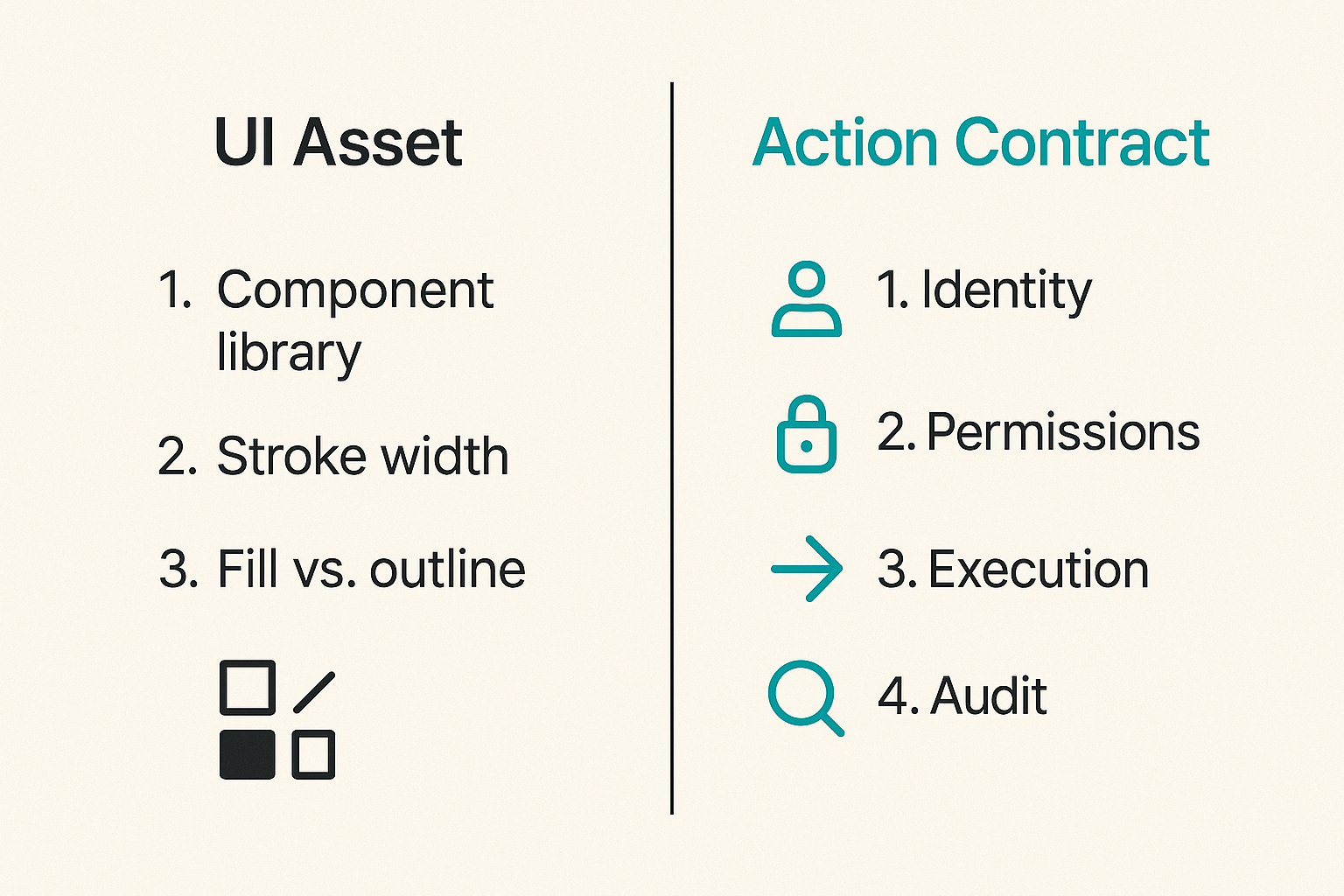
The mistake teams make is treating icon tools like a component library problem. They ask which SVG set to use, how to align stroke width, whether the icon should be filled or outlined, and how to package it for React or Swift.
Those details matter, but they are not the hard part. The hard part is that agent systems do not just render tools. They discover them, reason about them, request permission to use them, execute them, recover from failures, and explain what happened after the fact.
A button with a payment icon may represent opening a checkout page, creating a payment intent, releasing escrow, refunding a charge, or sending a payment request. Those are not cosmetic differences. They are different operations with different risk, settlement behavior, and support consequences.
Related reading from our network: teams dealing with public infrastructure make a similar mistake when they treat exposure as a checkbox instead of a workflow; the storage example in Security Public Storage in 2026 maps closely to tool exposure in agent platforms.
The real boundary is tool identity
An icon tool needs a stable identity that survives UI changes. If the platform swaps the icon from a paper plane to an arrow, nothing about the underlying capability should change. If the provider changes the behavior, the icon should not silently imply the old behavior.
A useful way to think about it is this: the icon is the visible handle for a registered capability. The capability has a name, owner, version, permission model, execution adapter, and audit trail. The icon is just one projection of that capability.
Practical rule: Never use the visual asset as the source of truth for the tool. The registry entry is the source of truth; the icon only points to it.
This matters more in 2026 because agent platforms are becoming multi-provider by default. A workspace may expose internal tools, MCP servers, hosted plugins, browser automation, payments, ticketing, credential sharing, and event workflows. If all of those are represented by icons but not bound to contracts, users see a neat interface while the platform accumulates ambiguity.
What an icon tool actually represents in agent systems
Capability, provider, and credential context
An icon tool is not just a capability. It is a capability in context.
Consider a Create ticket tool. The human sees a ticket icon. The agent sees a possible action. The platform needs more detail:
- Which provider owns the tool?
- Which workspace registered it?
- Which credential will be used?
- Which user or agent is acting?
- Which environment is targeted?
- Which scopes are required?
- Which downstream object may be changed?
Without that context, tool selection becomes guesswork. The icon may say ticketing, but the execution path may create a production incident, a customer support case, or an internal task. Those need different policy and audit treatment.
This is where standards language matters. If your team is still using spec, protocol, schema, contract, and convention as interchangeable labels, the architecture differences are worth making explicit; we covered that distinction in Synonyms of Standards in AI Agent Systems.
Display metadata versus execution contract
Separate display metadata from execution contract early. Display metadata answers what to show. The execution contract answers what can happen.
Display metadata usually includes:
- icon name or asset reference
- short label
- description
- category
- provider logo
- localization keys
- accessibility label
Execution contract usually includes:
- stable tool ID
- semantic version
- input schema
- output schema
- required scopes
- risk level
- idempotency behavior
- retry behavior
- audit event mapping
- owner and support contact
The mistake teams make is putting execution hints into labels and descriptions because the registry does not have fields for them. That leads to prompts like Use this to send invoices, but do not send if amount is over 5000 unless the user approves. That is not a contract. That is a fragile instruction embedded in copy.
The minimum schema for icon tools
Stable identifiers and versioning
The schema does not need to be huge. It does need to be boring, explicit, and stable.
A minimal icon tools record might look like this:
tool_id: com.acme.billing.invoice.send
version: 2.1.0
provider: acme-billing
display:
  label: Send invoice
  icon: invoice-send
  category: billing
  description: Send an approved invoice to a customer
execution:
  adapter: mcp.acme.billing.send_invoice
  input_schema: schemas/invoice-send-input.yaml
  output_schema: schemas/invoice-send-output.yaml
permissions:
  scopes:
    - invoice:read
    - invoice:send
  risk: external-message
  approval_required: conditional
audit:
  event_type: invoice.sent
  subject_ref: invoice_id
  idempotency_key: invoice_id:recipient_id
owner:
  team: billing-platform
  support: billing-platform-oncall
The important part is not the exact field names. The important part is the boundary. The icon is display metadata. The tool ID and execution adapter define what happens. The permission block defines who may do it. The audit block defines what must be recorded.
Scopes, permissions, and risk labels
Icon tools need risk labels because humans approve actions quickly and agents optimize for available affordances. A calendar search and a calendar invite do not carry the same risk. A draft email and a sent email do not carry the same risk. A simulated payment and a settled payment definitely do not carry the same risk.
Risk labels should be short enough for UI display and strict enough for policy engines. Examples:
- read-only
- draft-only
- internal-write
- external-message
- financial-action
- credential-access
- irreversible-action
Practical rule: If two icon tools require different approval rules, they are different tools even when they share the same icon asset.
The platform should not infer risk from the icon category. A lock icon does not make a tool safe. A warning icon does not make it controlled. Risk belongs in the registry and should be enforced at runtime.
Human-readable labels without prompt leakage
Labels and descriptions are inputs to user trust. They may also be visible to agents. That makes them easy to misuse.
Do not hide policy in natural language descriptions. Do not include secrets, internal routing notes, or prompt-only instructions. Do not depend on an LLM to parse a sentence that should have been a permission flag.
What works:
- short action labels
- clear tense and object
- separate policy fields
- separate agent instructions when needed
- localization keys instead of hardcoded copy
What fails:
- overloaded labels like Sync and send if ready
- descriptions that imply approval but do not enforce it
- icons reused across unrelated side effects
- provider-specific jargon exposed to end users
Discovery and registration workflow for icon tools
Catalog ingestion
The practical question is how tools enter the system. In small demos, a developer hardcodes a list. In production, tools arrive from packages, plugins, MCP servers, internal services, partner integrations, and tenant-specific extensions.
You need an ingestion path before you need a prettier icon grid.
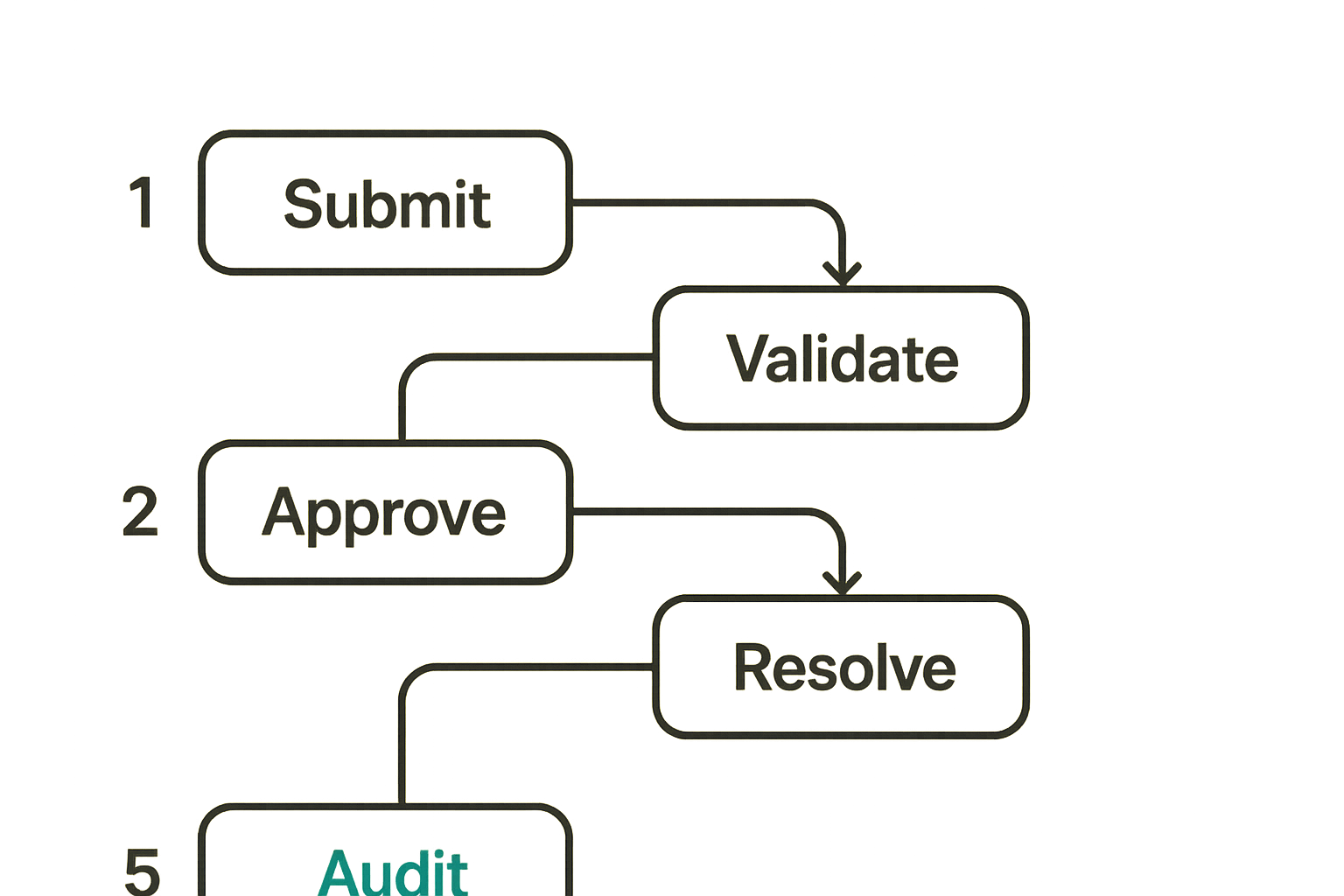
A workable registration sequence looks like this:
- Provider submits a tool manifest with display, schema, permission, and audit metadata.
- Platform validates the manifest against a published schema.
- Security or platform policy checks scopes, risk, owner, and allowed environments.
- Design or product checks user-facing labels and icon mapping.
- Registry assigns or confirms the canonical tool ID and version.
- Runtime resolver publishes the tool to eligible tenants, users, or agents.
- Execution events are logged against the same tool ID used in discovery.
This sequence creates a chain from visual discovery to runtime behavior. It also creates places to reject bad tools before users see them.
Related reading from our network: the coordination problem is not unique to agents; local organizers face the same routing and follow-up failure modes described in First Community, just with people instead of tools.
Validation and approval
Validation should happen in layers.
Schema validation answers whether the manifest is shaped correctly. Policy validation answers whether the tool is allowed. Runtime validation answers whether the execution adapter still matches the registered contract.
Common checks include:
- tool ID follows namespace rules
- version is semver-compatible
- input and output schemas are resolvable
- icon reference exists and has accessible labels
- required scopes are known
- risk label is allowed for the provider
- owner and support route are present
- audit event type maps to a known event taxonomy
- idempotency behavior is declared for write operations
Practical rule: A tool without an owner is not a tool. It is future operational debt with an icon attached.
Approval does not need to be bureaucratic, but it must be explicit. If a tool can send data outside the workspace, change money state, share credentials, or mutate production resources, someone should approve the registration before it appears in agent discovery.
Runtime resolution
Runtime resolution is where many designs get exposed. The registry may know that com.acme.billing.invoice.send exists, but the current user may not have the right credential. The agent may be running in a sandbox. The workspace may have disabled external messages. The provider may be degraded.
The UI should not show every registered icon tool as equally available. The resolver should return state:
- available
- unavailable because credential missing
- unavailable because scope missing
- unavailable because policy blocked
- degraded because provider status is unhealthy
- requires approval
- requires human handoff
This prevents the common pattern where an agent plans around a tool that cannot execute. It also prevents users from clicking dead icons and blaming the agent.
Permissioning, credentials, and delegated action
User-owned credentials
When icon tools act through user-owned credentials, the platform must preserve the relationship between human intent, agent delegation, and provider authorization. A user granting calendar access to an agent does not mean every icon tool in the workspace can now send calendar invites.
Scopes should bind to tool IDs or capability classes, not just providers. The user may allow Search calendar but require approval for Create event. The same provider credential can support both, but the policy should distinguish them.
Credential sharing also needs an explicit standard surface. For example, when a platform lets a human share limited access with an agent or plugin, the boundary should be modeled as a workflow, not a hidden token handoff; LogicSRC covers this kind of pattern in its credential sharing work.
Agent-owned service accounts
Some tools should not run as the user. Internal maintenance tools, scheduled jobs, indexing actions, and background syncs may run through service accounts. That can be cleaner, but it changes the audit question.
If an agent-owned account triggers a tool, the log still needs to capture:
- initiating agent
- requesting user or workflow
- service account used
- policy decision
- input summary
- output summary
- downstream object references
Do not let service accounts become a bypass around user consent. If a tool is exposed through an icon in a user workflow, the user-facing semantics must match the runtime authority.
Revocation and audit
Revocation must be boring and reliable. If a user disconnects a provider, the icon tool should become unavailable for that user. If an admin disables a tool, agents should stop discovering it. If a scope is removed, cached plans should fail safely.
Audit events should reference the same stable tool ID used in the registry. This seems obvious until an incident review contains only generic events like tool.call or plugin.execute. Those are not enough.
A useful audit record includes:
- tool ID and version
- icon label at time of execution
- actor and delegated actor
- credential reference or class
- policy decision ID
- approval reference
- idempotency key
- provider request ID
- result state
What breaks in practice is not usually the happy path. It is explaining six weeks later why an agent selected a tool, which permission allowed it, and whether the user saw an accurate label.
UI patterns that do not break execution
Icon grids are not enough
Icon grids are good for scanning. They are bad as the only source of meaning.
A grid of icon tools should include enough state to prevent false confidence. If a tool is read-only, show that. If it requires approval, show that. If it is connected to a specific provider account, make that visible before execution. If the action is destructive, do not hide that behind a cute icon.
Teams often copy app launcher patterns from SaaS products. That pattern breaks when the icon is not an app but an executable capability. An app launcher opens a context. An icon tool may mutate state.
Status, confidence, and handoff
Agent interfaces need to show more than available or unavailable. They need to show execution confidence and handoff requirements.
Useful states include:
- ready to run
- needs missing input
- needs credential
- needs approval
- safe to simulate
- draft created
- waiting on provider
- failed safely
- completed with side effects
These states make the workflow legible. They also help support teams. If a customer says the agent did not send the invoice, support should know whether the tool was unavailable, blocked by policy, waiting for approval, or failed at the provider.
Accessibility and localization
Accessibility is not optional metadata. If an icon tool can trigger real action, users need text alternatives that describe the action accurately. The alt text for a decorative icon is not enough.
Localization also matters because action labels carry legal and operational meaning. Translate Create draft differently from Send message. Translate Request payment differently from Capture payment. The registry should store localization keys and reviewed strings, not random provider-supplied copy.
Related reading from our network: media operations teams hit a comparable support issue when UI labels hide network, device, and workflow state; Information Technology for Streaming, Torrents, IPTV, and Home Media Operations is adjacent reading on making operational state visible.
What breaks when icon tools are implemented badly
Duplicate tools and shadow actions
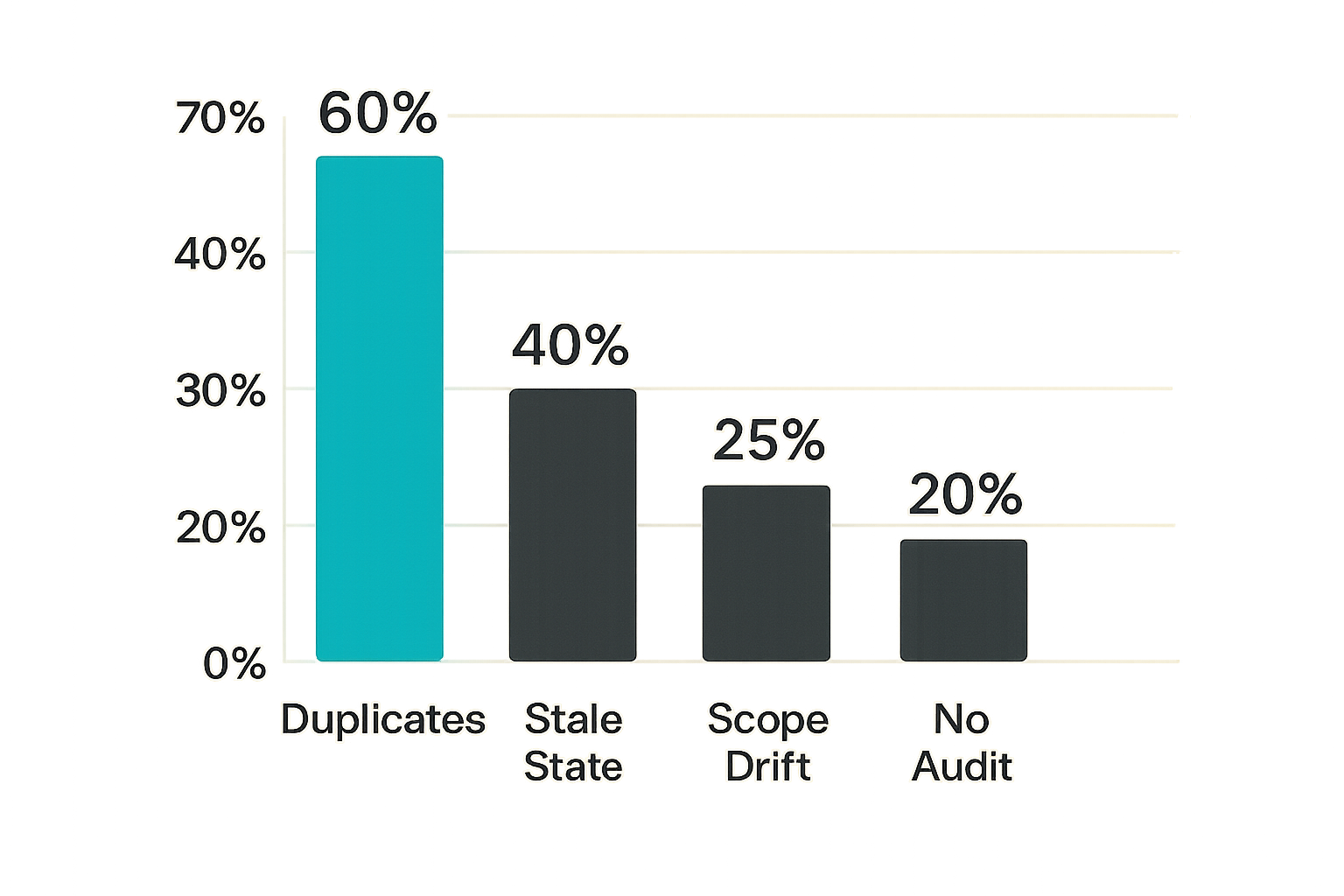
Duplicate tools are the first failure mode. One team registers Send invoice. Another registers Email invoice. A provider plugin registers Deliver invoice. All three use a similar icon. Agents see three candidates. Users see three buttons. Logs show three event names.
Now policy has to catch up to ambiguity. One tool requires approval. One does not. One logs invoice.sent. Another logs message.sent. The third logs plugin.action. Nobody intended to create a bypass, but the platform did.
The fix is registry-level deduplication and capability review. Namespaces help, but they are not enough. You need semantic review for high-risk classes like payments, external messages, credential access, and production changes.
Broken retries and stale state
Icon tools that mutate state need idempotency and state awareness. If the user clicks twice, if the agent retries after a timeout, or if the provider returns an ambiguous response, the platform must avoid duplicate side effects.
A payment icon without idempotency can charge twice. A messaging icon can send duplicates. A ticket icon can create ten incidents during a provider outage. The UI may look clean while the workflow behaves badly.
Declare retry behavior in the contract. For write operations, require an idempotency key. For long-running actions, expose pending states. For external providers, record provider request IDs. For agent planning, let the runtime say this action is already in progress.
Silent privilege expansion
Silent privilege expansion happens when a harmless-looking icon becomes attached to broader capability over time. A Search docs tool later gains Export docs. A Draft reply tool later gains Send reply. A View credential status tool later gains Share credential.
This is why versioning and approval matter. Adding a new side effect should create a new version, a new risk review, and potentially a new icon tool. Backward compatibility is not a reason to smuggle new authority into an existing affordance.
Practical rule: If the side effect changes, treat it as a contract change. If the risk class changes, treat it as a new approval event.
Comparison: icon tools as assets versus icon tools as contracts
Where static asset thinking fails
Static asset thinking works when icons decorate navigation. It fails when icons represent executable operations. The platform cannot answer policy questions from an SVG. It cannot route audit events through a filename. It cannot decide whether an agent should call a tool because the icon is named send.svg.
The table below is the operational difference.
| Decision area | Icon as asset | Icon as contract |
|---|---|---|
| Source of truth | Design library | Tool registry |
| Identity | File name or component name | Stable tool ID and version |
| Permissions | Handled elsewhere, often inconsistently | Declared scopes and risk labels |
| Execution | UI click handler | Registered adapter or protocol call |
| Agent discovery | Prompt text or hardcoded list | Catalog with schemas and policies |
| Audit | Generic click or call event | Tool-specific event with actor context |
| Failure handling | Toast message | State machine, retries, idempotency |
| Ownership | Design or frontend team | Product, platform, security, and provider owner |
Where contract thinking works
Contract thinking gives every stakeholder a place to attach their requirements.
Frontend gets display metadata. Agents get tool descriptions and schemas. Platform gets routing and policy. Security gets scopes and approvals. Support gets audit events. Providers get versioning and compatibility rules. Users get labels that match what actually happens.
That does not remove design work. It makes design safer because the icon is no longer carrying meaning alone.
What works:
- one registry entry per executable capability
- distinct tools for distinct side effects
- explicit unavailable states
- schema validation before publication
- audit events tied to tool IDs
- approval rules bound to risk labels
What fails:
- reusing icons across different actions without labels
- stuffing policy into descriptions
- exposing provider tools directly without review
- letting agents discover tools that users cannot run
- logging only generic tool calls
Implementation workflow for platform teams
Start with the registry
Do not start with the component library. Start with the registry model.
The registry should be queryable by UI, agent runtime, policy service, and audit pipeline. It does not have to be a separate product on day one. It can be a versioned manifest repository with validation and publishing rules. What matters is that it becomes the canonical source.
Minimum registry capabilities:
- register tool manifests
- validate schemas
- assign canonical IDs
- map icon assets to tools
- publish versions by environment
- expose discovery APIs
- resolve availability per actor
- emit change events
- preserve historical labels for audit
If you cannot answer which version of a tool was visible to a user yesterday, your registry is not doing enough.
Add execution adapters
Execution adapters connect the contract to reality. They may call MCP servers, REST APIs, internal queues, browser automation, payment providers, or hosted plugin runtimes.
Keep adapters narrow. An adapter should implement the registered action, not become a general provider client with hidden behavior. If the provider client supports twenty operations, expose twenty reviewed tools or fewer curated tools, not one magic icon that can do anything.
A practical adapter boundary includes:
- validate input against registered schema
- check runtime policy decision
- attach idempotency key
- call provider or internal service
- normalize result state
- emit audit event
- return user-safe status
This is also where MCP and other open agent protocols need discipline. Protocol-level discovery is useful, but platform-level policy still decides which tool is visible, to whom, and under what constraints.
Test with failure cases
Happy-path tests are not enough. Test the cases that create incidents.
Use this sequence:
- Register two tools with similar labels and verify deduplication review catches the ambiguity.
- Remove a credential and verify the icon becomes unavailable before execution.
- Retry a write action after a simulated timeout and verify idempotency prevents duplicates.
- Upgrade a tool version with a new side effect and verify policy requires approval.
- Disable a tool for a tenant and verify agents no longer discover it.
- Execute a tool through delegated credentials and verify the audit trail includes user, agent, credential class, and policy decision.
- Localize the label and verify the translated copy still distinguishes draft, send, capture, refund, and delete semantics.
This is not overengineering. It is the minimum test surface for tools that agents can select and humans can approve.
Product fit: icon tools in open agent standards
Coordination surfaces
Icon tools sit at the intersection of several coordination surfaces: identity, tool discovery, permissions, events, credential sharing, audit, and human approval. That is why they should be designed alongside open agent standards, not after the fact as UI polish.
A stable tool identity helps agents reason across products. A shared permission vocabulary helps platforms explain risk. A consistent event model helps operators debug workflows. A credential-sharing boundary helps users delegate without losing control. None of this requires one vendor to own the whole stack. It requires conventions that can be implemented across SDKs, plugins, hosted products, and open source projects.
Where logicsrc.com fits
logicsrc.com is focused on the open schemas, primitives, and conventions that let humans, AI agents, plugins, payment systems, and hosted products coordinate without every integration becoming a one-off contract. The broader LogicSRC coordination primitives are relevant here because icon tools are one visible edge of a deeper interoperability problem.
The product fit is not an icon pack. It is the contract layer around tool identity, credential boundaries, events, and auditable workflows. If you are building a developer platform, agent SDK, plugin marketplace, or internal automation surface, the goal is to make tools portable enough to discover and strict enough to operate.
Closing: icon tools are operational contracts
The operator checklist
Icon tools should end with operational ownership, not visual approval.
Before shipping, ask:
- Does every icon tool map to a stable tool ID?
- Is display metadata separate from execution metadata?
- Are scopes and risk labels declared in the registry?
- Can the runtime resolve availability per actor and tenant?
- Are write actions idempotent?
- Are duplicate and overlapping tools reviewed?
- Do audit events include tool version, actor, delegated actor, credential class, and policy decision?
- Can users distinguish draft, simulation, approval, and final side effect states?
- Can agents discover only the tools they are allowed to use?
- Is there an owner for support and incident review?
Teams think the problem is choosing clear icons. The real problem is making sure the visible affordance matches the executable action. Once agents can plan, call, and chain tools, icon tools become part of the control plane.
The practical question is simple: if this icon is clicked by a human or selected by an agent, can your platform prove what it means, who allowed it, what happened, and how to undo or explain the result when something goes wrong?
Try logicsrc.com
logicsrc.com is for developers and platform teams building interoperable AI agent systems, SDKs, plugins, and hosted products. If you are standardizing icon tools as action contracts, start with the open coordination surface. Try logicsrc.com