Icon Tools in 2026: Build the Runtime Contract Behind Agent Actions

Teams add icon tools when an AI product starts to feel crowded. The agent can search, schedule, pay, summarize, deploy, and message, so the UI gets a row of small buttons that look simple enough.
Then production starts. A user clicks an icon. An agent invokes a plugin. A hosted product receives a request. A credential is used. A payment might be triggered. Nobody can explain which identity acted, which permission was checked, which state changed, or why the audit trail is missing the most important step.
Teams think the problem is icon tools as interface design. The real problem is icon tools as action architecture.
That changes the conversation. The practical question is not which icon set looks clean. The practical question is what contract sits behind every icon so agents, SDKs, plugins, hosted products, and humans can coordinate without turning every action into a custom integration.
Table of contents
- Icon tools are a runtime architecture problem
- What icon tools actually expose
- The contract model for icon tools
- Identity and permissions come before the button
- Workflow design from click to audit record
- Interoperability with MCP, plugins, and hosted products
- What breaks when icon tools are implemented badly
- Metrics, validation, and operational controls
- Implementation sequence for platform teams
- Where logicsrc.com fits into icon tools
Icon tools are a runtime architecture problem
The UI is only the last inch
An icon tool looks like a user interface element. In practice, it is a compact entry point into a distributed workflow. It may call a local SDK, an MCP server, a browser extension, a hosted product, a payment rail, a credential broker, or a human approval queue.
The mistake teams make is designing the icon first and the runtime contract later. That works for demos because the action path is narrow and controlled. It fails in production because real systems need identity, permissions, retries, state transitions, audit records, and rollback behavior.
A useful way to think about it is this: every icon is a promise. The user thinks the icon means do this safely. The agent thinks it means invoke this capability. The platform must know what safe means.
Practical rule: never add an icon tool unless you can describe the action contract behind it in one page.
Why this matters more in 2026
AI agents are no longer isolated chat widgets. They sit inside developer tools, marketplaces, CRM systems, finance workflows, support consoles, IDEs, browsers, and internal platforms. They do not just answer. They act.
That creates a coordination problem. One agent may ask another agent to execute a task. A plugin may expose a capability that a hosted product wraps in a nicer UI. A human may approve a step that is later executed by an automation service. If every icon tool carries its own permission model, event format, and audit story, the platform becomes a pile of special cases.
This is why open AI agent standards matter. The goal is not protocol fashion. The goal is to make action boundaries explicit enough that independently built systems can coordinate.
The operating model behind the icon
The operating model is the repeatable way your team answers five questions:
- Who or what is acting?
- What capability is being requested?
- What state is required before execution?
- What evidence is recorded after execution?
- Who owns failures, reversals, and disputes?
Related reading from our network: independent workers using AI face the same trust and workflow packaging problem from a different angle in the future of freelancing with AI.
What icon tools actually expose
The action surface
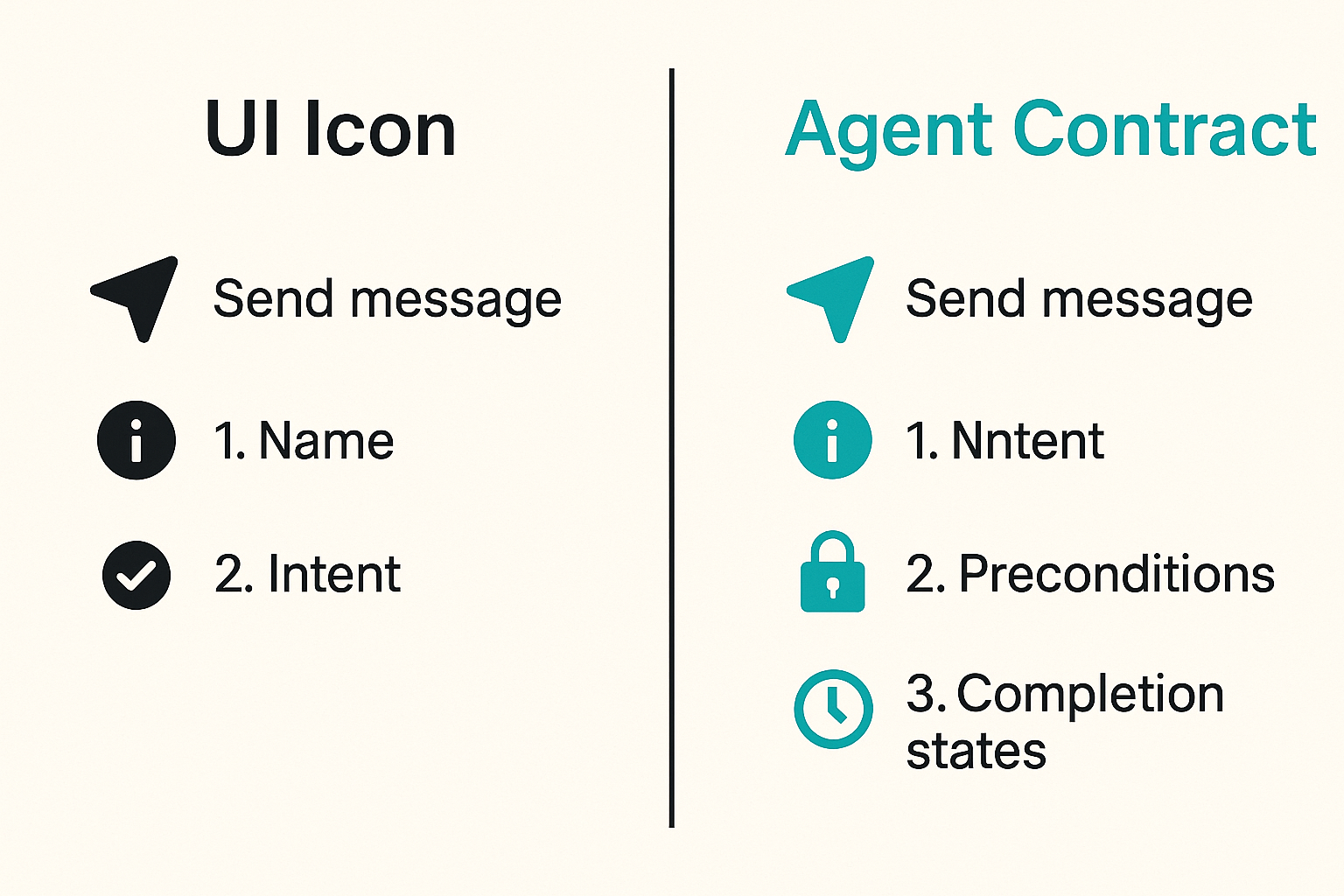
The action surface is the visible capability: send message, create ticket, deploy build, request credential, charge invoice, open pull request, book meeting, or approve refund.
For each action, define:
- Name: stable, human-readable, and machine-readable.
- Intent: what the action is supposed to accomplish.
- Preconditions: required state, identity, permissions, and inputs.
- Side effects: records created, external calls made, balances changed, messages sent.
- Completion states: succeeded, failed, pending, approved, rejected, expired, reversed.
A weak action surface says send. A useful action surface says send message to channel with approved identity, using scoped credential, after content policy check, with delivery event recorded.
The state surface
What breaks in practice is not usually the first call. It is the second call after partial success.
An icon tool may show a simple checkmark while the underlying workflow is still pending in another system. A payment can be authorized but not settled. A deployment can be triggered but not healthy. A credential can be shared but not accepted. An approval can be granted but expire before execution.
State must be modeled as a first-class surface. Do not reduce it to success or failure unless the action is truly atomic.
| State pattern | Works for | Fails when |
|---|---|---|
| Immediate success | Local read-only actions | External side effects exist |
| Pending state | Human approval, async APIs | No polling or webhook path exists |
| Reversible state | Refunds, access grants, changesets | Reversal ownership is unclear |
| Terminal failure | Validation errors, denied access | Retries could safely recover |
The trust surface
The trust surface answers why another system should accept the action. That may involve a signed request, a delegated credential, an agent identity, a human approval record, a payment authorization, or a policy decision.
The icon itself carries no trust. The runtime does.
Practical rule: if the receiving system cannot independently verify the actor, scope, and approval basis, the icon tool is just a remote control with weak accountability.
The contract model for icon tools
Inputs and outputs need boring precision
Good icon tools are boring at the boundary. Inputs are typed. Required fields are clear. Optional fields have defaults. Outputs are predictable. Error classes are stable.
A practical contract can be expressed with a schema like this:
tool: create_support_ticket
version: 2026-07-01
actor_type: human_delegated_agent
required_inputs:
  - customer_id
  - issue_summary
  - priority
permissions:
  - ticket.write
states:
  - requested
  - pending_approval
  - executed
  - failed
  - reversed
events:
  - tool.requested
  - tool.approved
  - tool.executed
  - tool.failed
This is not glamorous, but it is the difference between a reusable tool and a one-off button. The schema becomes documentation, validation input, runtime guardrail, and audit reference.
Capability envelopes beat vague permissions
Permissions like admin, write, or agent allowed are too broad for agentic systems. They make reviews easy and incidents painful.
A capability envelope should include:
- Permitted action.
- Resource scope.
- Time window.
- Actor identity.
- Delegation chain.
- Approval requirement.
- Spending or rate limit if relevant.
- Revocation path.
For a deeper treatment of this framing, the prior LogicSRC article on icon tools for agent actions, permissions, and audit is adjacent to this contract-first model.
Versioning is part of safety
Changing a tool contract changes operational risk. A new optional input may be harmless. A new default behavior may be dangerous. A changed permission check can break downstream systems that assumed the previous semantics.
Version icon tools like APIs. Keep old contracts available when possible. Mark deprecations. Emit events that include the tool version. Let audit queries filter by version.
The mistake teams make is treating tool updates as UI releases. They are runtime changes.
Identity and permissions come before the button
Separate human identity from agent identity
A user may ask an agent to act, but the agent is still an actor in the system. Treating the agent as the user removes useful detail. Treating the user as the agent removes accountability.
You need both:
- Human principal: the person or organization authorizing intent.
- Agent principal: the software actor interpreting and executing the task.
- Runtime principal: the service account or hosted product performing the call.
- Recipient principal: the system accepting the action.
This separation matters when something goes wrong. If a refund is issued, a credential is leaked, or a deployment breaks production, you need to know whether the user requested it, the agent inferred it, the runtime executed it, or the recipient accepted it incorrectly.
Delegation needs a scope and a clock
Delegation without expiration becomes shadow access. Delegation without scope becomes ambient authority.
A good delegation record states that one actor may perform a specific capability on a specific resource for a specific period under specific constraints. It should be revocable and auditable.
Example:
delegation:
  human: acct_123
  agent: agent_build_helper
  capability: deploy.preview_environment
  resource: repo_456
  expires_at: 2026-07-15T18:00:00Z
  approval_required: false
  max_attempts: 2
This may feel heavy until the first incident. Then it feels like the minimum viable record.
Credential sharing is a workflow, not a secret dump
Many agent actions eventually need access to something: an API key, OAuth token, wallet capability, repository permission, internal system credential, or customer-approved access grant.
The failure mode is familiar. A team lets agents use broad secrets because narrow delegation is annoying. The platform ships quickly, then nobody knows which agent had access to what, when, and why.
Credential sharing should be explicit, scoped, revocable, and evented. LogicSRC treats credential sharing as a coordination primitive because agent systems need to pass authority without turning every integration into a secret-management exception.
Practical rule: do not let an icon tool execute with a credential that cannot be tied to a specific actor, purpose, scope, and time window.
Workflow design from click to audit record
Model the full lifecycle
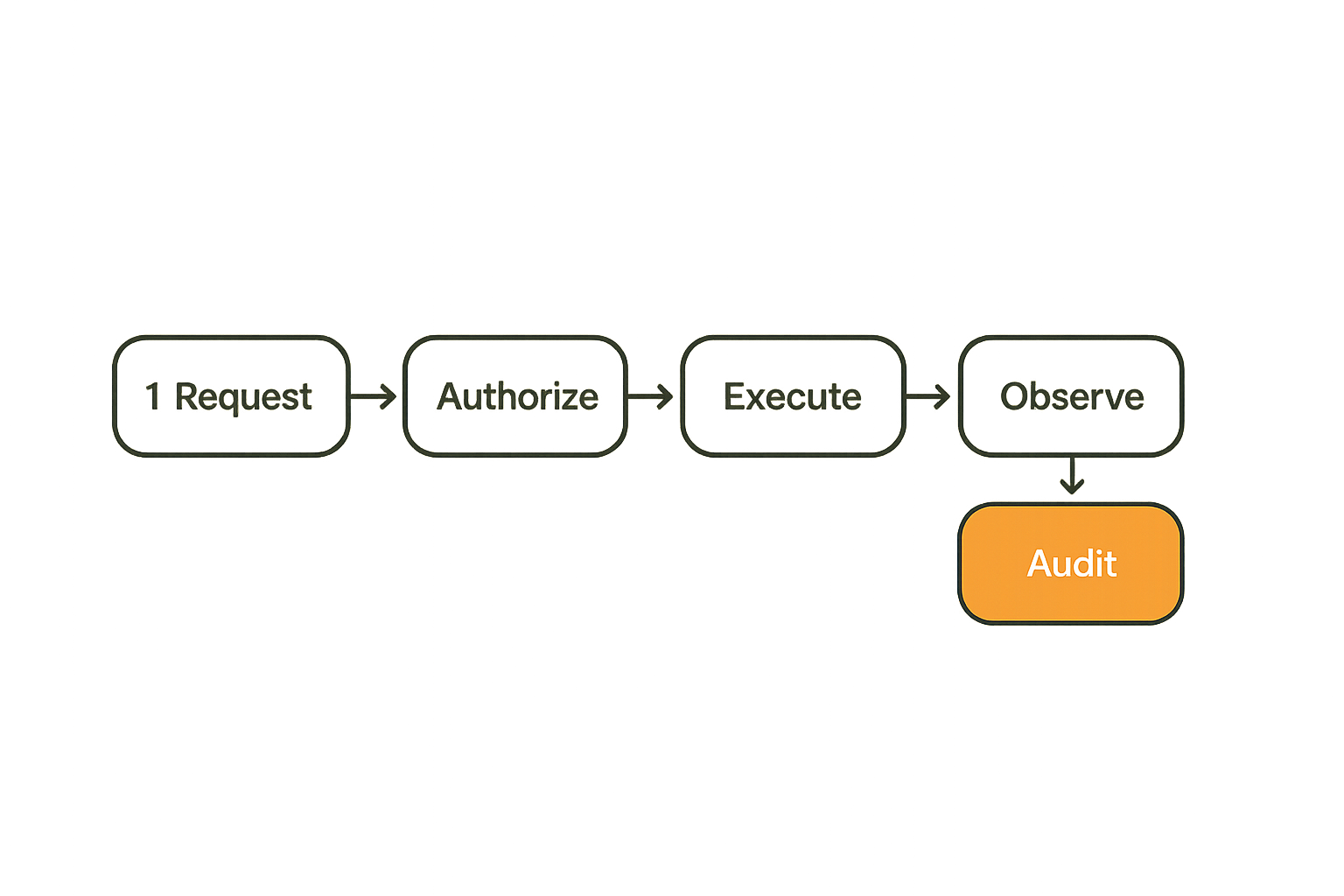
A production icon tool needs a lifecycle, not just a handler function. The minimum lifecycle is:
- Request: actor invokes a named tool with structured input.
- Validate: platform checks schema, state, identity, and permission.
- Authorize: runtime confirms delegation, policy, and approval requirements.
- Execute: system performs the action or queues it.
- Observe: webhook, poller, or callback confirms downstream state.
- Record: audit event stores actor, scope, version, result, and evidence.
- Resolve: support path handles retry, reversal, dispute, or escalation.
If a step is missing, the system may still work on happy paths. It will not be operable.
Retries and idempotency are not optional
Agent systems retry. Networks fail. Users double-click. Workers crash. Webhooks arrive late. Plugins return ambiguous responses.
Every write-capable icon tool should have an idempotency key that survives across retries. The key should bind to intent, actor, target resource, and tool version. If the same request is retried, the platform should return the known result or current state instead of duplicating the side effect.
What works:
- Generate idempotency keys before execution.
- Store request hash and actor context.
- Return existing operation state on retry.
- Treat timeout as unknown until observed.
- Separate execution result from delivery confirmation.
What fails:
- Retrying payment, deployment, or message sends without deduplication.
- Marking success before downstream confirmation.
- Letting each adapter invent its own retry behavior.
- Losing request context when a queue worker restarts.
Human approval should be explicit state
Approval is not a modal window. It is a state transition.
The approval record should include approver identity, requested capability, context shown to the approver, decision time, expiration, and any constraints added during approval. If the agent changes the plan after approval, the approval may no longer apply.
Related reading from our network: local coordination systems have similar routing and follow-up problems, which are covered in the first community operating model.
Interoperability with MCP, plugins, and hosted products
Normalize semantics before protocols
MCP, plugins, SDKs, and hosted APIs can all expose useful capabilities. The practical risk is assuming the protocol solves the semantics.
It does not. A protocol can define how a tool is called. It may not define what approval means, how delegation is represented, how audit evidence is stored, or who owns reversal.
Before choosing adapters, normalize the semantic model:
- Tool name and purpose.
- Actor and delegation fields.
- Permission vocabulary.
- State machine.
- Event taxonomy.
- Error classes.
- Audit evidence.
Once those are stable, protocol adapters become much less dangerous.
Avoid protocol monoculture
A single protocol can simplify early integration. It can also become a trap if every internal assumption is hard-coded to that protocol.
Open agent systems will continue to use multiple transports and integration patterns. Some tools will be local. Some will be remote. Some will be event-driven. Some will require browser context. Some will run inside a hosted product with its own permission model.
Design the contract above the transport. Then support MCP, REST, events, SDK calls, or plugin manifests as implementation choices.
Use adapters without hiding ownership
Adapters are useful when they translate between your internal contract and external tools. They become dangerous when they hide who owns policy, state, and incident response.
For each adapter, document:
- Source contract version.
- Target protocol or API.
- Permission mapping.
- State mapping.
- Retry strategy.
- Event emission behavior.
- Operational owner.
The adapter should make differences visible. It should not pretend every external tool behaves the same.
What breaks when icon tools are implemented badly
Tool sprawl creates invisible policy drift
Tool sprawl starts innocently. One team adds a Slack icon. Another adds a deploy icon. A third adds a billing icon. Each uses a slightly different permission check, event format, and error path.
Six months later, nobody knows which tools require approval, which support revocation, which are safe to retry, or which emit audit events. The icons still look consistent. The runtime is not.
This is why a tool registry matters. If a capability is powerful enough to expose to agents or users, it is powerful enough to register.
Audit gaps turn routine actions into investigations
When an action goes wrong, the first question is not whether the icon looked clear. The first question is what happened.
Bad audit trails omit one of the following:
- Original user intent.
- Agent interpretation.
- Permission decision.
- Credential used.
- Downstream request identifier.
- State transition.
- Human approval context.
- Tool version.
When those fields are missing, support and security teams reconstruct events from logs that were never designed for this purpose. That is expensive and unreliable.
Support teams inherit architecture debt
Support teams become the integration layer of last resort. They explain duplicate actions, stuck pending states, expired approvals, missing credentials, and unclear ownership.
A platform architect may call these edge cases. A support operator calls them Tuesday.
Related reading from our network: privacy-focused messaging systems face similar production tradeoffs around metadata, retention, and validation in secure messaging apps.
Practical rule: if support cannot answer what happened from the tool record alone, the icon tool is not production-ready.
Metrics, validation, and operational controls
Measure workflow health, not button usage
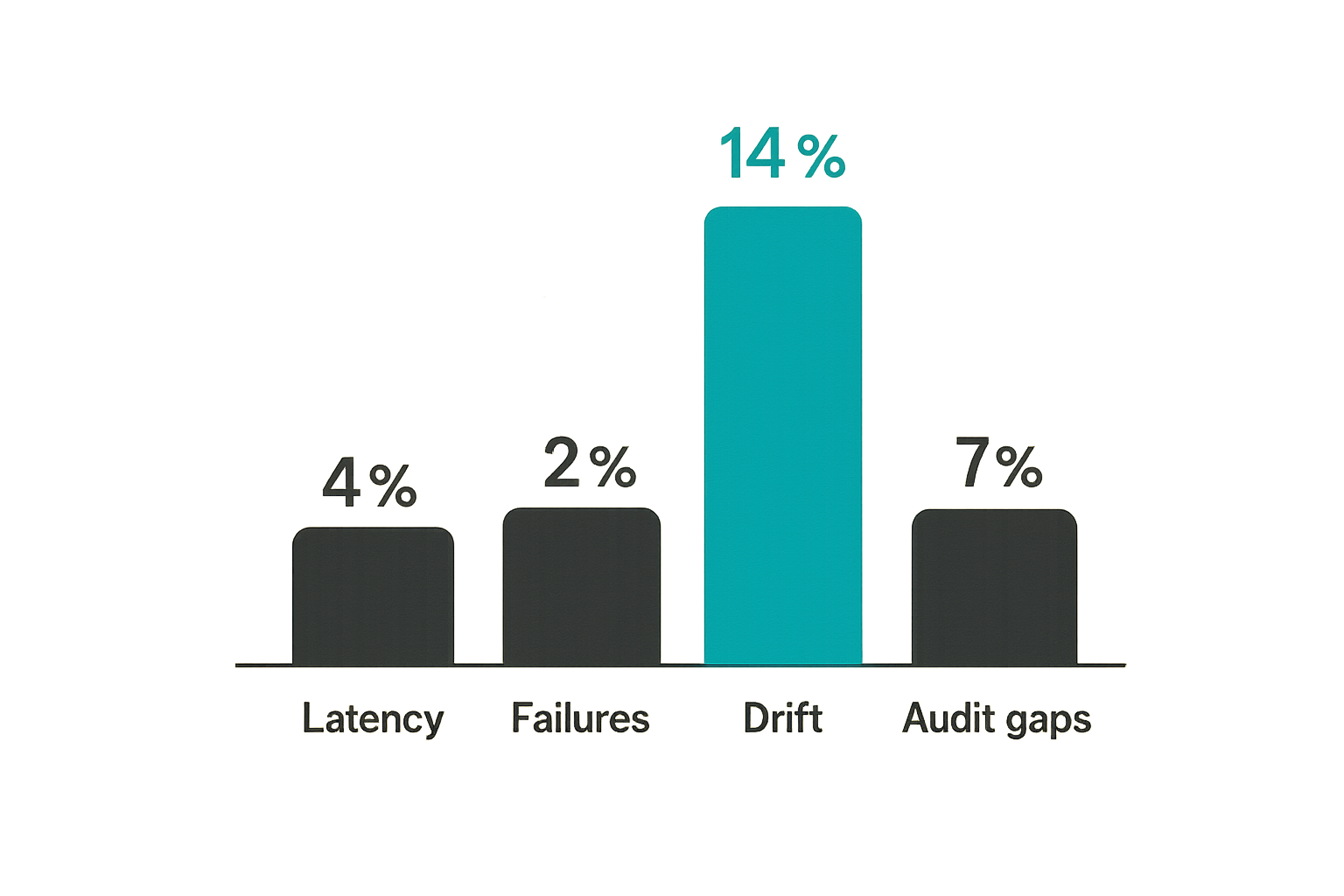
Counting clicks is mostly vanity. It tells you that users found the icon. It does not tell you whether the action is safe, reliable, or useful.
Better metrics include:
- Request-to-execution latency.
- Approval wait time.
- Pending operations older than threshold.
- Retry rate by tool and adapter.
- Idempotency collisions.
- Permission denial rate.
- Reversal or dispute rate.
- Audit completeness percentage.
- Downstream error class distribution.
These metrics make icon tools operable. They also show which tools should not have been exposed yet.
Test harnesses should simulate bad state
Happy-path tests are not enough. Icon tools fail at boundaries: stale credentials, expired delegations, duplicate requests, partial downstream success, webhook delay, schema mismatch, rate limit, revoked approval, and permission drift.
Build a test harness that can simulate:
- Agent retries after timeout.
- Human approval after expiration.
- Downstream success with lost response.
- Credential revoked between validation and execution.
- Adapter returns unknown error.
- Tool version mismatch.
- Audit sink temporarily unavailable.
The point is not to make failures disappear. The point is to make failures legible.
Incident response starts in the schema
Incident response is easier when the schema already contains the fields responders need. If you wait until an incident to decide what evidence matters, you will be stuck with whatever logs happen to exist.
Each tool event should include actor, tool, version, resource, permission decision, delegation reference, approval reference, request identifier, idempotency key, state, timestamp, and evidence pointer.
That sounds verbose. It is cheaper than an incident review based on screenshots and guesses.
Implementation sequence for platform teams
Start with a tool registry
Do not begin by redesigning every icon. Start with an inventory.
Create a registry with these fields:
| Registry field | Why it matters |
|---|---|
| Tool identifier | Stable reference for agents and logs |
| Owner | Clear operational responsibility |
| Capability | What the tool can actually do |
| Permission scope | Who may invoke it and under what conditions |
| State machine | How execution progresses |
| Adapter | Which protocol or API implements it |
| Audit events | What evidence is emitted |
| Version | Which contract is active |
The registry becomes the source of truth for UI rendering, agent discovery, documentation, policy review, and support workflows.
Define schemas and ownership
After inventory, define the contract for the highest-risk tools first. Prioritize tools that write data, move money, share credentials, change access, message external users, deploy code, or trigger irreversible work.
A practical rollout sequence:
- Classify tools by risk and side effect.
- Assign an owner for each tool.
- Define input and output schemas.
- Define states and transitions.
- Map permissions and delegation requirements.
- Add idempotency and retry policy.
- Emit audit events to a common sink.
- Expose only compliant tools to agents.
The mistake teams make is starting with the most visible tool. Start with the most dangerous tool.
Ship adapters last
Adapters are tempting because they create visible progress. A new connector feels like a shipped feature. But if the contract is weak, every adapter multiplies ambiguity.
Ship adapters after the semantic model is stable. When you do ship them, keep adapter behavior explicit. If an external API cannot support a state or permission requirement, mark that gap in the registry and decide whether the tool should be exposed.
For teams building broader coordination layers, about LogicSRC explains the open schemas and primitives approach behind identity, agents, payments, events, credentials, MCP, and auditable workflows.
Where logicsrc.com fits into icon tools
Open standards surface, not a closed control plane
LogicSRC is useful when icon tools need to operate across agents, plugins, hosted products, payment systems, credential flows, and evented workflows. The point is not to own every runtime. The point is to provide a standards surface that makes coordination explicit.
That means treating icon tools as contracts with shared fields for identity, delegation, capabilities, events, credentials, and audit evidence. Different teams can still build different UIs, SDKs, and hosting models. They do not need to invent the action semantics from scratch each time.
This is the architectural value: the icon stays small, but the contract behind it becomes portable.
When the fit is strong
The fit is strong when your platform has any of these patterns:
- Agents invoking tools across product boundaries.
- Plugins that need consistent permission checks.
- Hosted products exposing actions to third-party agents.
- Credential sharing between humans, agents, and services.
- Payment or settlement actions that require auditability.
- MCP integrations that need consistent state and event models.
- Open source maintainers defining reusable agent capabilities.
LogicSRC is less useful if your icon tools are local-only, read-only, and never leave one trusted process. In that case, a simple internal schema may be enough.
The practical question is whether your icons are just shortcuts or whether they represent actions other systems must trust. If they cross trust boundaries, you need a contract.
Try logicsrc.com
Build icon tools as interoperable action contracts, not decorative buttons. logicsrc.com is for developers and platform teams building open AI agent systems, SDKs, plugins, and hosted products.