Mac Tools for AI Agent Builders: The 2026 Architecture Guide

Mac tools used to mean editors, terminals, package managers, and a few productivity shortcuts. For AI agent builders in 2026, mac tools now sit inside the execution path. They launch local models, expose MCP servers, hold credentials, proxy plugin calls, generate traces, and decide what an agent can actually do.
Teams think the problem is choosing the best Mac setup. The real problem is building a workstation architecture that can safely participate in an agent system.
That changes the conversation. A Mac is not just where developers write code. It is a runtime boundary, an identity boundary, a permission boundary, and often the first place an AI workflow fails in a way nobody can reproduce.
The practical question is not which tool is popular. The practical question is which mac tools create stable contracts between local development, hosted products, open standards, credentials, events, and users who expect the workflow to behave the same way tomorrow.
Table of contents
- Why mac tools are now an agent architecture decision
- The mac tools stack for agent builders in 2026
- Model context protocol turns tools into contracts
- Credentials identity and consent on developer machines
- Events logs and state are the real debugging surface
- Testing mac tools before they touch real users
- What breaks when mac tools are implemented badly
- A practical rollout workflow for mac tools
- Choosing between native apps CLIs plugins and hosted controls
- Where logicsrc.com fits
- Closing checklist for mac tools
Why mac tools are now an agent architecture decision
The mistake teams make is treating a developer Mac as an implementation detail. That was survivable when the local machine only compiled code, ran tests, and pushed commits. It is less survivable when the same machine runs agent loops, grants tool permissions, stores OAuth tokens, starts MCP servers, and proxies calls into customer-facing systems.
A useful way to think about it is this: every local tool that an agent can call becomes part of your product architecture. If the tool reads files, it participates in data access. If it sends network requests, it participates in integration. If it signs requests, it participates in identity. If it mutates state, it participates in workflow execution.
Local runtime is part of production
Many agent teams still draw a clean line between local development and production. In practice, agent systems blur that line. A local runtime may be used to test real integrations, inspect production-like events, evaluate customer workflows, or operate a hosted product through internal tools.
That does not mean every Mac is production. It means production assumptions leak onto the Mac.
You need to know which model provider is used locally, which MCP servers are running, which directories are exposed, which credentials are available, and which tools can perform irreversible actions. If that sounds like platform engineering, that is the point.
Practical rule: If an agent can call it, log it, version it, permission it, and document its expected behavior.
The workstation becomes a trust boundary
Mac tools have always had access to sensitive things: SSH keys, browser sessions, local files, package registries. Agents increase the blast radius because they can chain actions. Reading a README is low risk. Reading a README, discovering a deployment script, finding credentials, and calling a production API is a different class of system.
The trust boundary is not only the device. It is the combination of user identity, agent identity, tool permissions, local state, and hosted policy. If those pieces are not explicit, teams end up relying on habit: developers know what not to do, agents are assumed to behave, and logs are checked after something breaks.
Related reading from our network: platform teams dealing with remote work run into similar boundary problems when collaboration tools mix screen access, remote control, and operational permissions, as covered in cloud based productivity and collaboration tools.
The mac tools stack for agent builders in 2026
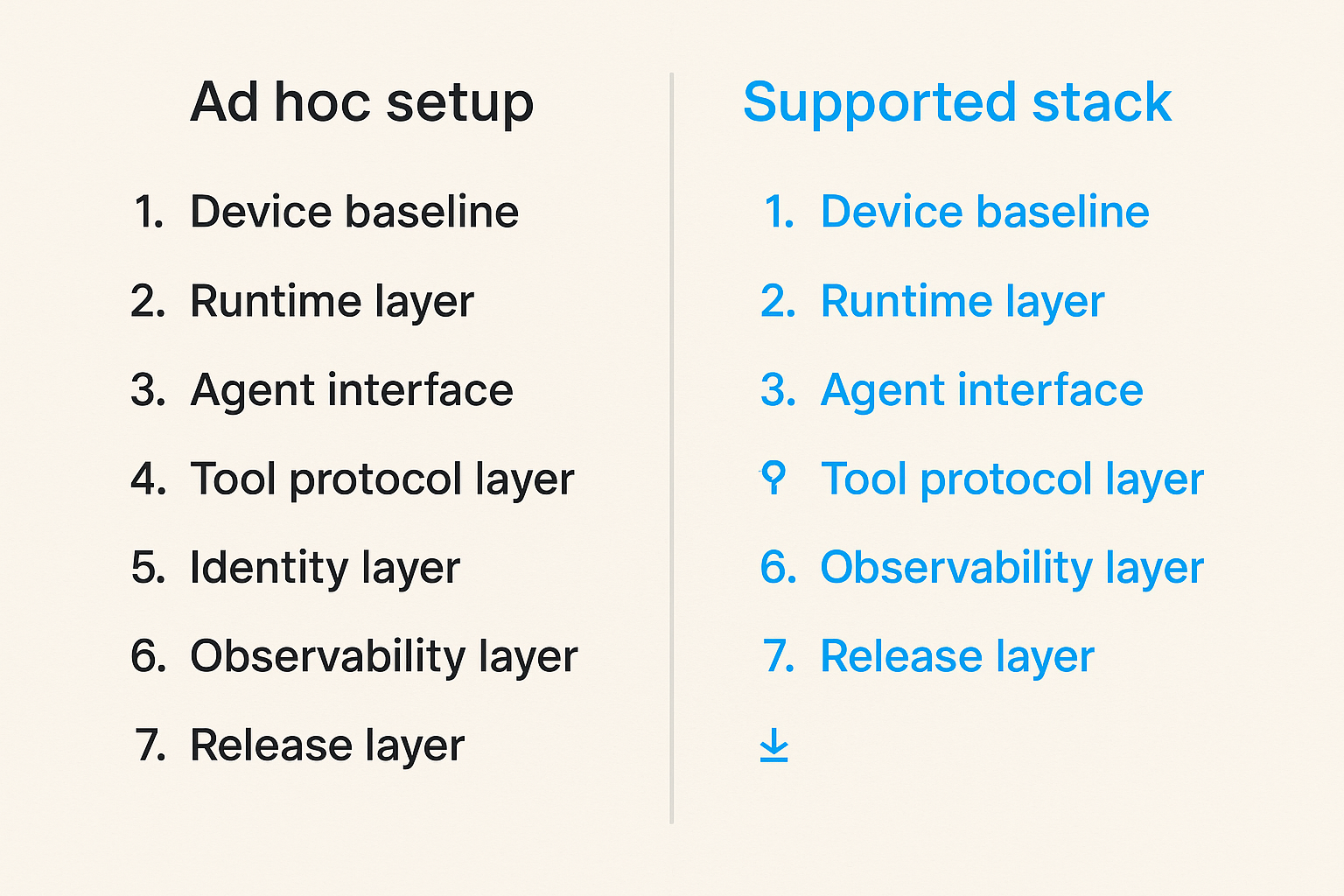
The practical stack is not a random list of apps. It is a layered system. Each layer should have an owner, an update policy, a failure mode, and a contract with the layers above and below it.
This is where mac tools become easier to reason about. Instead of arguing about one terminal, one editor, or one agent app, define the surfaces your team supports.
Core layers to standardize
For AI agent builders, the useful layers usually look like this:
- Device baseline: macOS version, chip architecture, security settings, disk encryption, MDM posture if applicable.
- Runtime layer: Node, Python, uv, pnpm, Docker or container alternative, local model runners, background services.
- Agent interface: CLI agent, IDE extension, desktop agent shell, browser-based console, or internal operator tool.
- Tool protocol layer: MCP servers, plugin manifests, OpenAPI descriptors, event schemas, permission definitions.
- Identity layer: SSO, OAuth apps, service accounts, short-lived tokens, local keychain access.
- Observability layer: structured logs, traces, replay files, local redaction, correlation IDs.
- Release layer: installation scripts, pinned versions, update channels, rollback path.
The mistake teams make is standardizing the visible layer and ignoring the contract layers. They mandate an IDE but leave every MCP server version floating. They publish a CLI but let credentials live in scattered dotfiles. They support a plugin but cannot reproduce the local event sequence that led to a bad action.
What belongs on the machine and what does not
Not every capability belongs locally. Some tools should live on the Mac because latency, developer feedback, or file access matters. Others should stay hosted because they need centralized policy, audit, rate limiting, or shared state.
A workable rule is to keep interpretation close to the developer and authority close to the platform. Let the Mac inspect, simulate, propose, and stage changes. Make hosted systems approve, execute, settle, notify, and audit high-impact actions.
For example, a local agent can generate a migration plan from repository context. A hosted workflow should approve the plan, bind it to a change request, execute it with scoped credentials, and record the result. This keeps the Mac useful without turning every laptop into an ungoverned control plane.
Model context protocol turns tools into contracts
MCP made local tool access feel simple, which is both useful and dangerous. The good part is obvious: tools can expose capabilities to agents in a more consistent way. The bad part is also obvious in production: a tool contract that is easy to create is also easy to create badly.
For a deeper workstation-focused companion, the earlier guide on mac tools for AI agent workflow architecture walks through local runtimes, MCP, credentials, and testing as a connected stack.
MCP servers need product discipline
An MCP server should be treated like a small product surface, not a script with a socket. It needs stable names, clear input schemas, predictable errors, versioning, permission language, and examples. If the server can mutate state, it needs dry-run behavior and explicit confirmation boundaries.
Good MCP tools are boring. They do one thing clearly. They return structured data. They fail loudly when required context is missing. They do not hide side effects behind friendly descriptions.
A minimal internal convention might look like this:
tool: create_issue
version: 1.2.0
side_effect: writes_external_state
requires:
  - project_id
  - title
  - requester_identity
supports_dry_run: true
returns:
  - issue_id
  - issue_url
  - audit_event_id
That kind of metadata makes the tool easier for agents to reason about, but more importantly, it makes the tool easier for humans to operate.
Avoid one off adapters
One-off adapters are the fast path to a demo and the slow path to a maintainable platform. They usually start with a useful goal: connect this agent to that internal system. Then the adapter grows private assumptions about auth, retries, pagination, errors, and side effects.
What breaks in practice is not the first call. It is the tenth integration, when each adapter has slightly different semantics. One returns partial success. One silently retries. One mutates state during validation. One logs tokens in debug mode. One requires a developer to have a browser session open.
Practical rule: Do not let every tool invent its own contract for identity, errors, retries, logging, and side effects.
Related reading from our network: security teams face the same pattern when disconnected products create noisy signals without shared context, which is why security systems architecture is ultimately a workflow and signal problem, not a shopping list.
Credentials identity and consent on developer machines
Credentials are where mac tools become operationally serious. An agent that can access a local credential store is no longer just assisting. It may be acting with the developer's authority, the organization's authority, or a poorly defined mix of both.
The practical question is who is allowed to do what, through which tool, under which policy, with what evidence afterward.
Separate human identity from agent authority
A human user may be allowed to inspect production logs. That does not automatically mean a local agent should be allowed to summarize, export, or mutate the same environment. Teams need explicit delegation.
A better pattern is to separate these concepts:
- Human identity: who is operating the workstation.
- Agent identity: which agent, model, or workflow is requesting action.
- Tool identity: which MCP server, plugin, CLI, or app performs the action.
- Session authority: what is allowed during this run.
- Audit subject: who or what is recorded as responsible.
This is not bureaucracy. It is how you prevent every local workflow from collapsing into one overloaded developer token.
LogicSRC's work around credential sharing is relevant here because agent systems need conventions for delegated access that do not reduce to copying secrets between tools.
Keep secrets out of prompts and logs
Agents make accidental disclosure easier because they turn operational context into text. A log line becomes prompt context. A prompt becomes a trace. A trace becomes a support artifact. A support artifact gets copied into an issue.
You need redaction at the boundary, not cleanup after the fact. Do not rely on developers to remember which values are sensitive. Mark secrets, tokens, customer identifiers, and private file paths before they enter the agent loop.
Practical rule: Secrets should be referenced by handle, not pasted into prompts, traces, fixtures, or support tickets.
A simple local policy can require tools to return handles for sensitive values:
secret_ref: vault://workspace/github/deploy-token
visible_to_agent: false
usable_by_tool: deploy_preview
expires_in: 15m
audit_required: true
This lets an agent request an action without seeing the secret needed to perform it.
Events logs and state are the real debugging surface
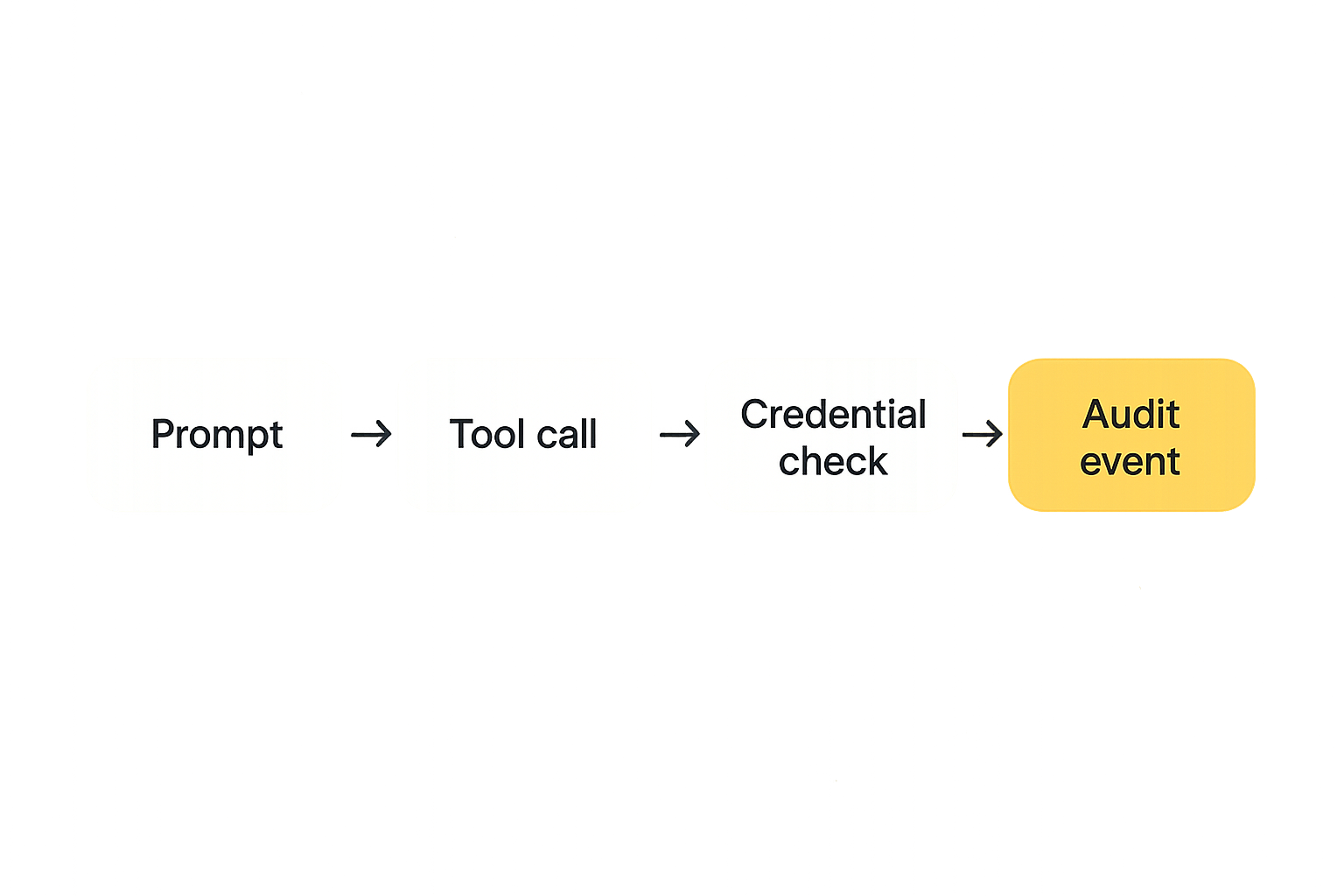
When an agent workflow fails, screenshots are rarely enough. The failure might involve a prompt, a tool call, an MCP server response, a stale token, a retry, a partial write, and a user approval. If those are not connected, the team ends up debugging folklore.
The mistake teams make is logging output but not state transitions. Agent systems need event trails that show what happened, why it happened, under whose authority, and what changed.
Treat every agent action as an event
An event does not need to be complicated. It needs to be consistent. Every meaningful action should emit a timestamp, actor, tool, input reference, output reference, correlation ID, side-effect classification, and result.
A local event shape might include:
event_type: agent.tool.invoked
correlation_id: wf_8f31
actor: agent:repo-maintainer
human_operator: user:maya
workspace: payments-sdk
tool: mcp.github.create_issue
side_effect: writes_external_state
result: success
output_ref: trace://local/2026-06-10/1842
This gives you enough to reconstruct behavior without dumping every sensitive value into the log.
Correlate local traces with hosted workflows
Local traces are useful, but only if they connect to hosted systems. If a Mac tool stages a change and a cloud workflow executes it, both sides need the same correlation ID. Otherwise support sees two unrelated stories.
This is especially important for products that support plugins, hosted agent actions, payment workflows, or credential delegation. The user does not care which side of the boundary failed. They care that the workflow did not complete.
Related reading from our network: independent operators face a smaller version of this quality-control problem when AI tools touch client deliverables, which makes AI tools for freelancers a useful adjacent comparison for workflow ownership.
Testing mac tools before they touch real users
Agent testing is not only model evaluation. It is tool evaluation. A model that makes a reasonable plan can still cause damage if the tool contract is ambiguous, the credential scope is too broad, or the local runtime is stale.
The practical testing goal is to prove that the tool behaves correctly under normal use, partial failure, missing context, expired credentials, retries, and user denial.
Build fixtures for tools and permissions
Every supported tool should have fixtures. Not just happy-path inputs. You need fixtures for empty repositories, permission denied responses, duplicate requests, invalid IDs, rate limits, partial success, and irreversible actions.
For a create issue tool, test cases might include:
- Valid issue creation with dry run enabled.
- Valid issue creation with dry run disabled and approval present.
- Missing project ID.
- Expired token.
- Duplicate idempotency key.
- Remote API returns partial success.
- User denies the final action.
These cases catch integration mistakes that prompt evaluation will never see.
Replay failures instead of guessing
A serious agent toolchain needs replay. When a workflow fails, you should be able to rerun the same event sequence against a safe environment. That requires captured inputs by reference, versioned tool definitions, deterministic fixtures where possible, and clear separation between simulation and execution.
Do not replay against production by default. Do not replay with live credentials unless the workflow explicitly requires it and the operator understands the impact. The point of replay is to reduce guessing, not create a second incident.
Practical rule: If support cannot replay the failed path safely, the workflow is not operationally ready.
What breaks when mac tools are implemented badly
Most failures are not dramatic. They are small inconsistencies that compound until nobody trusts the agent workflow. One developer's Mac works. Another's fails. The hosted trace says success. The local tool says timeout. The customer sees no update. The maintainer is asked to inspect a private log file that contains a token.
This is why mac tools need operational ownership. Without it, your platform accumulates invisible local dependencies.
Failure mode one local drift
Local drift happens when every workstation becomes its own snowflake. Different Node versions, different MCP server builds, different environment variables, different model settings, different plugin permissions. The agent behaves differently because the execution environment is different.
The fix is not to eliminate local flexibility. The fix is to define the supported path. Pin versions where behavior matters. Publish checks. Fail early when the workstation is outside the supported profile.
Failure mode two invisible authority
Invisible authority happens when an agent acts through a credential nobody modeled. Maybe the token came from a browser session. Maybe a CLI had an old login. Maybe an environment variable was inherited by a child process. The action works, but nobody can explain which policy allowed it.
This is the worst kind of success. It trains teams to trust an undocumented path.
A better system refuses to act when authority is implicit. The user should see which identity, agent, tool, scope, and target system are involved before a meaningful side effect occurs.
Failure mode three support cannot reproduce issues
Support breaks when local state is required to understand a hosted workflow. If the only evidence is a developer's terminal scrollback, the system is not supportable. If the only fix is to ask the user to clear caches, reinstall tools, and try again, the architecture is leaking complexity into support.
Reproducibility requires traces, versions, input references, permission snapshots, and safe replay. That sounds heavy until you compare it with the cost of debugging agent behavior from memory.
A practical rollout workflow for mac tools
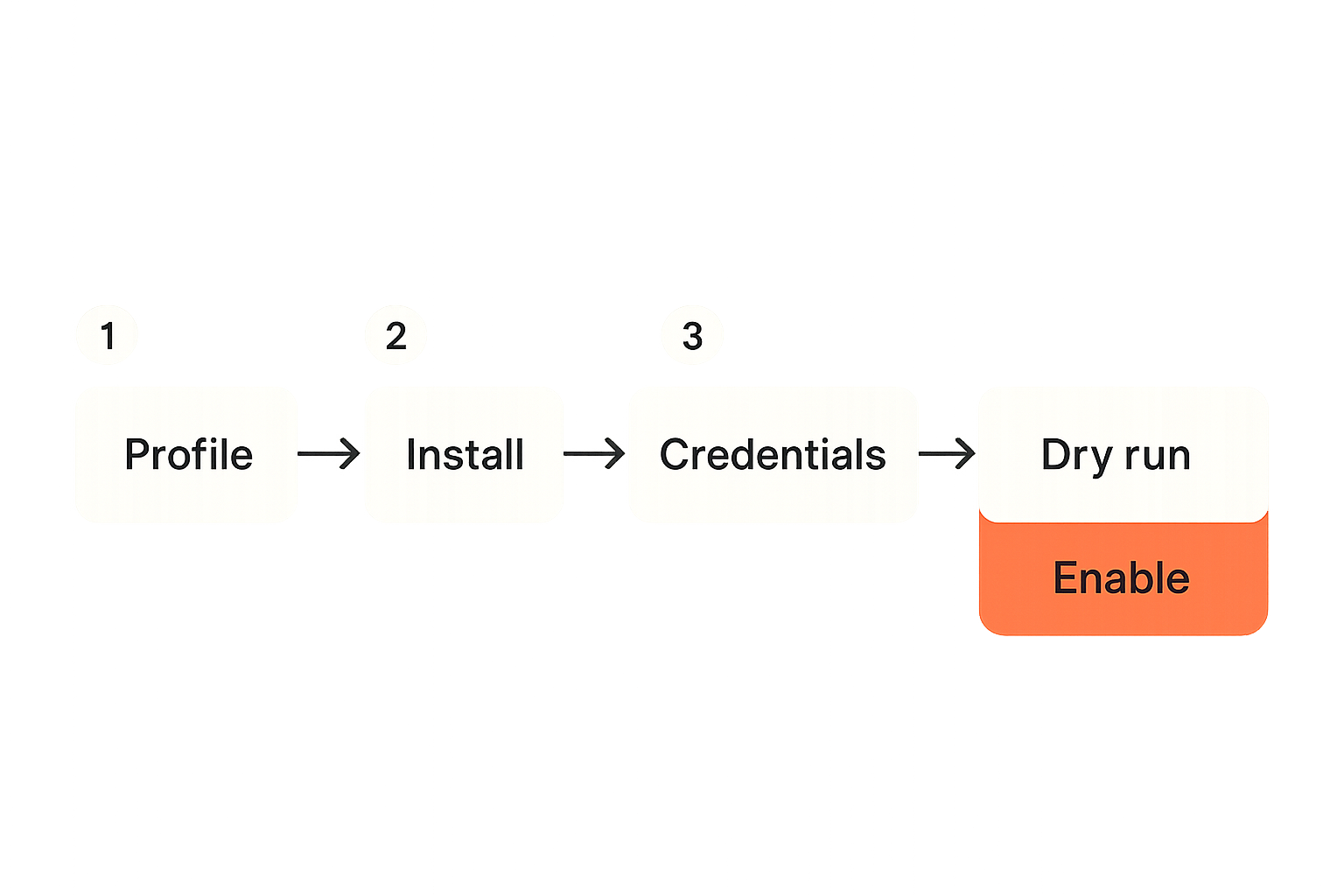
You do not need a massive platform program to make this sane. You need a rollout workflow that treats the Mac stack as part of the product system.
Start small. Pick one agent workflow that matters. Define the local tools it uses, the credentials it needs, the events it emits, and the hosted systems it touches. Then make that path boring.
Step one define the supported workstation profile
Document the baseline. Include macOS version range, required runtimes, package manager, agent interface, MCP server versions, credential storage method, logging location, and update policy.
A useful profile is specific enough to test:
profile: agent-builder-mac-2026
macos: 15.x or 16.x
node: 22.x
python: 3.12
package_manager: pnpm 10.x
mcp_servers:
  github: 1.4.x
  docs: 0.9.x
credential_store: macOS keychain plus hosted token broker
trace_format: lsrc-agent-events-v1
This profile becomes your support contract. If a workflow is outside it, say so clearly.
Step two publish the install and update path
Installation should not be tribal knowledge. Publish a bootstrap script, a verification command, and a rollback path. The verification command matters more than the installer because it tells operators whether the workstation is still in a valid state.
A good verification command checks versions, running services, permissions, credential reachability, trace write access, and network connectivity to required endpoints. It should not perform destructive actions.
Number the rollout sequence:
- Bootstrap the workstation with pinned runtime versions.
- Install approved MCP servers and tool manifests.
- Register the agent interface with the hosted control plane.
- Request scoped credentials through the approved broker.
- Run a dry-run workflow against fixtures.
- Emit a local trace and confirm hosted correlation.
- Allow real workflow execution only after validation passes.
Step three validate the agent workflow end to end
End-to-end validation should include a real agent plan, tool calls, consent boundary, hosted execution, event correlation, and support replay. If you only validate that the CLI starts, you have not validated the workflow.
This is where many teams cut corners. They test the agent prompt, then separately test the API, then separately test auth. The failure usually lives between those pieces.
Choosing between native apps CLIs plugins and hosted controls
The interface matters, but not for the usual reasons. Developers argue about ergonomics. Platform teams need to reason about state, permissions, audit, updates, and failure recovery.
Different mac tools surfaces are good for different jobs. The wrong choice creates either too much local authority or too much hosted friction.
Comparison table for tool surfaces
| Surface | Best for | Operational risk | What to standardize |
|---|---|---|---|
| Native Mac app | Persistent local context, user approvals, background sync | Hidden local state and opaque updates | Update channel, permissions, trace export |
| CLI | Repeatable workflows, scripting, CI-like behavior | Leaky env vars and inconsistent shells | Version pinning, config path, exit codes |
| IDE plugin | Code-aware assistance and repository actions | Overbroad file access and plugin drift | Workspace scope, tool permissions, logs |
| MCP server | Agent tool access and shared contracts | Side effects hidden behind tool names | Schemas, errors, dry run, versioning |
| Hosted control plane | Policy, audit, approvals, execution | Latency and reduced local flexibility | Identity, events, approvals, rollback |
The answer is rarely one surface. A sane architecture often uses a CLI for repeatability, MCP for agent access, an IDE plugin for context, and a hosted control plane for authority.
What works
What works is explicit division of responsibility. Local tools collect context, propose actions, run simulations, and help developers move quickly. Hosted systems enforce policy, issue credentials, execute high-impact actions, and maintain audit history.
What also works is boring documentation. Tool names, versions, scopes, and failure behavior should be easy to inspect. If a developer cannot tell which agent tools are active, the system is too magical.
What fails
What fails is treating the UI as the system. A polished desktop agent does not solve credential scope. A clever IDE plugin does not solve event correlation. A fast CLI does not solve approval semantics. A hosted dashboard does not solve local drift.
The practical question is not which interface looks best in a demo. It is which interface creates the cleanest contract for the action being performed.
Where logicsrc.com fits
LogicSRC is about open schemas, primitives, and conventions for coordination between humans, AI agents, plugins, payment systems, hosted products, and auditable workflows. That is directly relevant to mac tools because local agent workstations need shared coordination surfaces, not another pile of private glue.
The overview at LogicSRC about frames this as an interoperability problem across agents, plugins, payments, events, and credentials rather than a single SDK or app category.
Open surfaces beat private glue
Private glue feels fast until you need multiple agents, multiple plugins, multiple hosted products, and multiple organizations to participate in the same workflow. Then every hidden assumption becomes a migration project.
Open surfaces make boring things portable: event names, credential references, action metadata, consent records, replay artifacts, and audit trails. These are not glamorous pieces of the stack, but they decide whether a workflow can be trusted across boundaries.
For mac tools, that means local actions should speak the same operational language as hosted systems. A local tool invocation should be understandable to a server-side workflow. A hosted approval should be understandable to a desktop agent. A credential reference should not depend on one vendor's private prompt convention.
Product fit for platform teams
If you are building agent SDKs, plugins, hosted control planes, or developer-facing AI products, the product-fit question is simple: can your users connect local and hosted work without inventing every convention themselves?
LogicSRC is useful when teams need shared primitives for identity, coordination, credential sharing, MCP-oriented tooling, events, and auditable workflows. It is not a replacement for your product. It is a standards-oriented surface that helps your product cooperate with other tools in the agent ecosystem.
That matters more as mac tools become part of real workflows instead of isolated developer preferences.
Closing checklist for mac tools
Mac tools are now part of the AI agent architecture. They influence runtime behavior, credential boundaries, MCP contracts, event visibility, support workflows, and user trust. If you treat them as personal setup choices, you will eventually debug platform failures through local guesswork.
The better path is to define the local stack as a supported system.
A short operator checklist
Use this as a starting point:
- Define the supported Mac workstation profile.
- Pin runtime and MCP server versions where behavior matters.
- Separate human identity from agent authority.
- Use scoped credentials and secret references, not copied tokens.
- Require dry-run behavior for mutating tools.
- Emit structured events for agent actions.
- Correlate local traces with hosted workflows.
- Build fixtures for permissions, retries, and partial failures.
- Provide a safe replay path for support.
- Keep high-impact authority in hosted policy controls.
The practical takeaway
The practical takeaway is that mac tools are not the strategy. The workflow contract is the strategy. The Mac is where developers operate, agents reason, tools execute, credentials appear, and traces begin. Treat that environment with the same discipline you apply to APIs and hosted infrastructure.
Do that, and mac tools become a reliable part of your agent platform instead of an undocumented source of drift.
Try logicsrc.com
You are writing for developers and platform teams building interoperable AI agent systems, SDKs, plugins, and hosted products. Try logicsrc.com.