Mac Tools for AI Agent Builders: A Practical 2026 Architecture Guide
Most AI agent projects do not fail because the model could not reason through a task. They fail because the agent touched five systems, used unclear credentials, produced no useful event trail, and worked only on the developer's laptop.
That is why mac tools matter more than they look. The question is not which terminal, launcher, editor, or local runtime is fashionable this month. The practical question is whether your Mac-based workflow can become a repeatable agent workflow that survives credentials, plugins, approval paths, webhooks, retries, and audits.
Teams think the problem is choosing better mac tools. The real problem is designing a local control plane for agent development.
That changes the conversation. Your Mac is not just a workstation. In 2026, it is often where MCP servers run, plugins are tested, credentials are delegated, events are inspected, and hosted agent behavior is reproduced before it hits production. If that architecture is accidental, every team member builds a different product.
If you want a narrower inventory of utilities and local setup choices, the earlier guide on mac tools for AI agent workflow architecture covers the workstation layer. This article goes deeper on the operating model: standards, boundaries, identity, testing, and auditability.
Table of contents
- Why mac tools are an agent workflow architecture problem
- Map mac tools to the agent lifecycle
- Standards first for mac tools MCP credentials and events
- Local runtimes and sandboxes
- Identity secrets and credential sharing
- Observability and audit trails on a Mac
- Testing agent workflows before they leave the laptop
- What breaks when mac tools are implemented badly
- A practical implementation sequence for platform teams
- Where logicsrc.com fits in an open agent toolchain
- Closing checklist for mac tools in agent systems
Why mac tools are an agent workflow architecture problem
The mistake teams make
The mistake teams make is treating mac tools as personal preference. One engineer uses one package manager. Another runs local services with a different launcher. Someone else tests MCP servers through an ad hoc script. Secrets live in shell profiles, editor settings, password managers, copied env files, and occasionally a prompt transcript.
That can work for a demo. It does not work for a platform team that needs to explain how an agent got permission to call a tool, which plugin version ran, which external account was touched, and whether the same workflow can be reproduced next week.
A useful way to think about it is this: every local tool either strengthens or weakens your agent contract. If it changes state, moves credentials, sends events, or hides behavior, it is part of the architecture.
The Mac is a control plane
For many AI engineering teams, the Mac is where these things converge:
- Local LLM runners and remote model clients.
- MCP servers and tool adapters.
- CLI agents and editor-integrated copilots.
- Secrets managers, keychains, SSH agents, and API tokens.
- Docker, dev containers, background services, and webhooks.
- Test harnesses, traces, and local event collectors.
That makes the Mac a control plane for development-time agent behavior. It does not own production, but it shapes production. If the local workflow is undocumented, production behavior becomes a guess.
Practical rule: if a Mac tool can grant access, mutate data, trigger an external workflow, or produce evidence, treat it as part of the agent system design.
Why this matters in 2026
Agent systems are moving from prompt experiments to delegated work. Agents schedule jobs, inspect repositories, update tickets, generate invoices, trigger payments, summarize security signals, and call internal services. The UI is not the whole system. The hard work is state, trust, settlement, ownership, and support.
Open standards help, but only when teams implement them as workflow boundaries. MCP is useful when it standardizes tool access. Event schemas are useful when they make behavior traceable. Credential sharing is useful when it prevents secret copying. Without operating discipline, standards become labels on the same old brittle scripts.
Map mac tools to the agent lifecycle
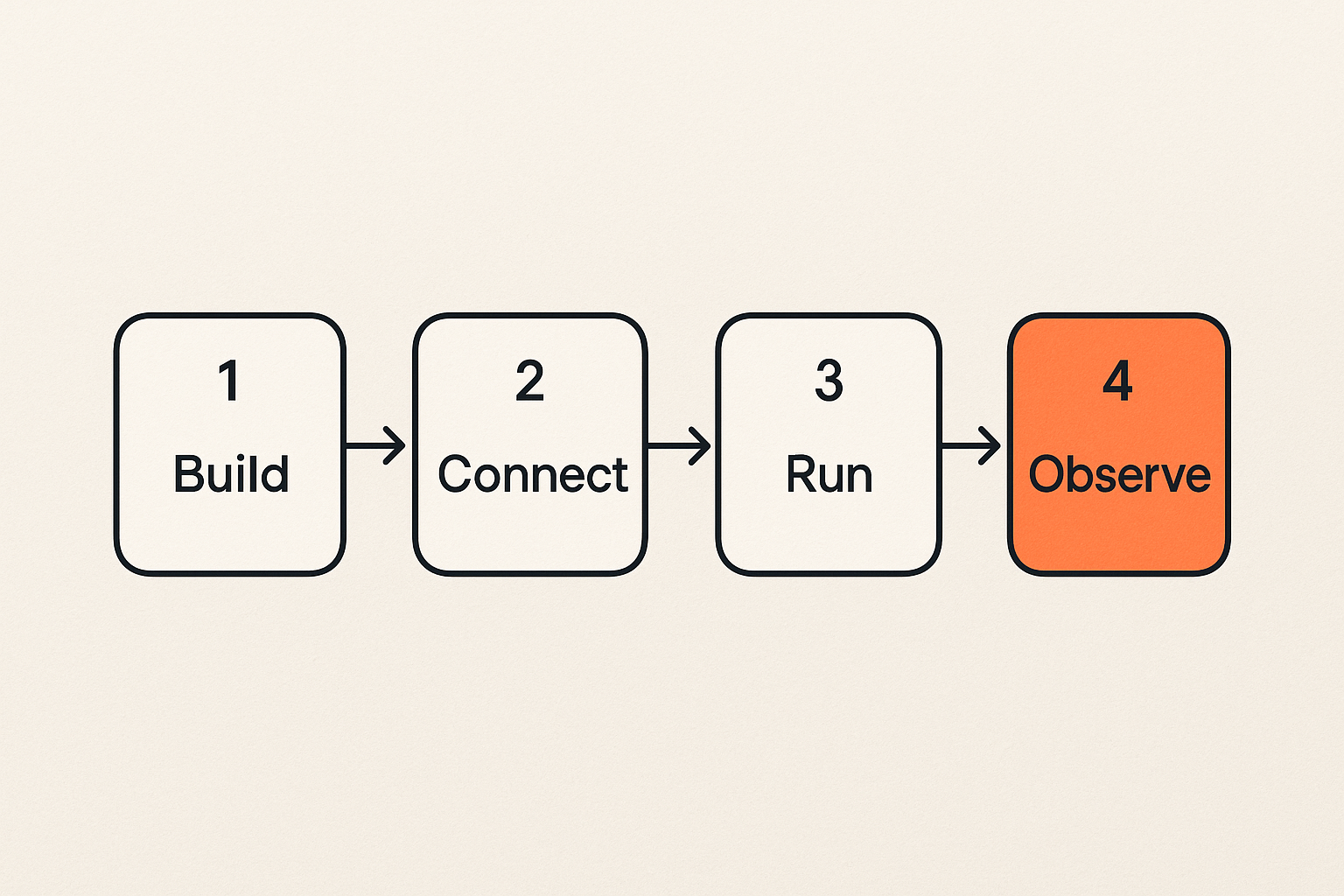
Build
The build phase includes editors, terminals, package managers, SDKs, local databases, mock services, and model clients. This is where engineers define tool schemas, prompts, policies, and integration code.
The risk is that build-time convenience becomes runtime assumption. A script that reads local environment variables might work on one laptop but fail in CI. A tool schema tested against a personal account might behave differently against a service account. A plugin that assumes interactive approval might deadlock in a hosted workflow.
What works is a local build environment that mirrors production contracts without pretending to be production. Use fixed versions. Make startup scripts explicit. Keep test fixtures separate from live credentials. Document which tools are required and which are optional.
Connect
The connect phase is where agents discover tools and obtain authority. In an MCP-based stack, this includes server discovery, capability declarations, tool schemas, transport configuration, authentication, and permission boundaries.
The practical question is not whether the agent can call the tool. The question is whether the caller, authority, scope, and expected side effects are clear enough that another system can reason about them.
A minimal tool contract should answer:
- Who is requesting the action?
- Which agent or runtime is acting?
- Which human, account, or organization delegated authority?
- What capability is being invoked?
- What data can be read or changed?
- What event will be emitted after success or failure?
Run
The run phase includes local runtimes, background daemons, shell commands, task queues, browser automation, containerized services, and hosted dev environments. What breaks in practice is uncontrolled execution. Agents get too much filesystem access, too many network paths, or too much persistence.
The local machine should support fast iteration, but not at the cost of unbounded authority. Use sandboxed directories for agent file work. Use explicit allowlists for network destinations where possible. Keep destructive tools behind approval gates. Separate dry-run tools from commit tools.
Observe
The observe phase includes logs, traces, event streams, terminal history, application logs, local databases, and screenshots or artifacts. Observation is not just debugging. It is how you build trust in agent workflows.
A good Mac toolchain lets an engineer answer three questions quickly:
- What did the agent intend to do?
- What tool did it actually call?
- What state changed after the call?
If you cannot answer those questions locally, you will not answer them reliably in production.
Standards first for mac tools MCP credentials and events
MCP is an interface boundary
MCP gives teams a cleaner way to expose tools to agents, but it should not become a dumping ground for arbitrary automation. Treat MCP servers as interface boundaries, not convenience wrappers.
A tool exposed through MCP should have a stable schema, predictable side effects, clear error behavior, and a documented permission model. If a tool internally calls a shell script that calls another shell script that reads a token from a dotfile, you did not standardize the workflow. You hid it.
Comparison matters here:
| Approach | Short-term benefit | Long-term cost | Better pattern |
|---|---|---|---|
| Random local scripts | Fast demos | No contract or audit | Wrap only stable capabilities |
| Prompt-only tool use | Easy iteration | Hard to validate | Use typed schemas and fixtures |
| Shared API keys | Low setup friction | Weak ownership | Use scoped delegated credentials |
| Local logs only | Simple debugging | Poor correlation | Emit structured events |
| One-off MCP servers | Quick integration | Version drift | Pin versions and publish contracts |
Credentials need delegation not copying
Agent authority is not the same as human login. An agent may act for a human, a team, a tenant, or a platform. Those cases need different scopes and audit trails.
The failure mode is familiar: a developer copies a token into a local env file, tests a tool, ships a similar pattern to a team template, and months later nobody knows which workflows depend on that token. This is not a tooling problem. It is an authority design problem.
For agent systems, credential sharing should mean delegated, scoped, revocable access. It should not mean passing raw secrets through prompts, issue comments, shell snippets, or shared docs. LogicSRC's work around credential sharing is relevant here because the useful primitive is not the secret itself; it is the convention for granting and proving limited authority.
Events are the contract between tools
Events are how local tools, hosted services, approval systems, payment flows, and audit logs agree on what happened. Without events, every integration becomes a private conversation between two pieces of code.
A useful event from an agent tool call should include:
- Actor identity.
- Delegator identity, if different.
- Agent or runtime identity.
- Tool name and version.
- Input summary, not raw sensitive data.
- Output status.
- Correlation ID.
- Timestamp.
- Policy decision or approval reference.
Practical rule: design the event before you design the dashboard. If the event is vague, the dashboard will only make vague behavior look polished.
Related reading from our network: security teams face the same context-sharing problem across detection and response tooling, which is covered in this practical guide to security systems and SOC architecture.
Local runtimes and sandboxes
Pick the runtime by failure mode
Local agent runtimes differ less by branding than by failure mode. Some fail by hiding too much state. Some fail by over-permissioning tools. Some fail by making reproducibility hard. Some fail by coupling a developer's personal environment to a team workflow.
When evaluating local mac tools, ask what happens when the workflow goes wrong:
- Can you replay the tool call?
- Can you revoke the credential used by the agent?
- Can you see which files changed?
- Can you isolate the model output from the tool side effect?
- Can CI run the same test without a laptop-specific dependency?
The right runtime is the one that makes failure observable and bounded.
Keep agent execution bounded
Agent workflows need fences. The model may reason broadly, but the runtime should execute narrowly. Give the agent a workspace, a tool list, and a scoped identity. Do not give it your whole laptop because the demo is easier that way.
For local file operations, use a dedicated workspace directory. For network calls, use mock endpoints until the contract is ready. For shell commands, prefer named tools with typed arguments over free-form terminal execution. For destructive operations, require explicit approval and emit an event.
A simple local policy file might look like this:
agent_runtime:
  workspace: ./agent-workspace
  network:
    allow:
      - api.dev.example.com
      - localhost:8080
  tools:
    create_ticket:
      approval: false
    refund_payment:
      approval: true
    run_shell:
      approval: true
      allowed_commands:
        - git status
        - npm test
  events:
    emit_to: local-event-collector
This is not about bureaucracy. It is about making the agent's execution surface legible.
Treat developer laptops as production adjacent
Developer machines are not production, but agent workflows make them production adjacent. A local agent can call real APIs, move customer-like data, trigger real notifications, or mutate shared repositories.
That means your Mac setup needs baseline controls:
- Device encryption and screen lock.
- Managed updates where appropriate.
- Separate work and personal identities.
- Secret storage outside repos.
- Local service inventory.
- Clear teardown process for departed maintainers or contractors.
Related reading from our network: remote teams face similar rollout and access tradeoffs when they standardize cloud based productivity and collaboration tools.
Identity secrets and credential sharing
Separate human identity from agent authority
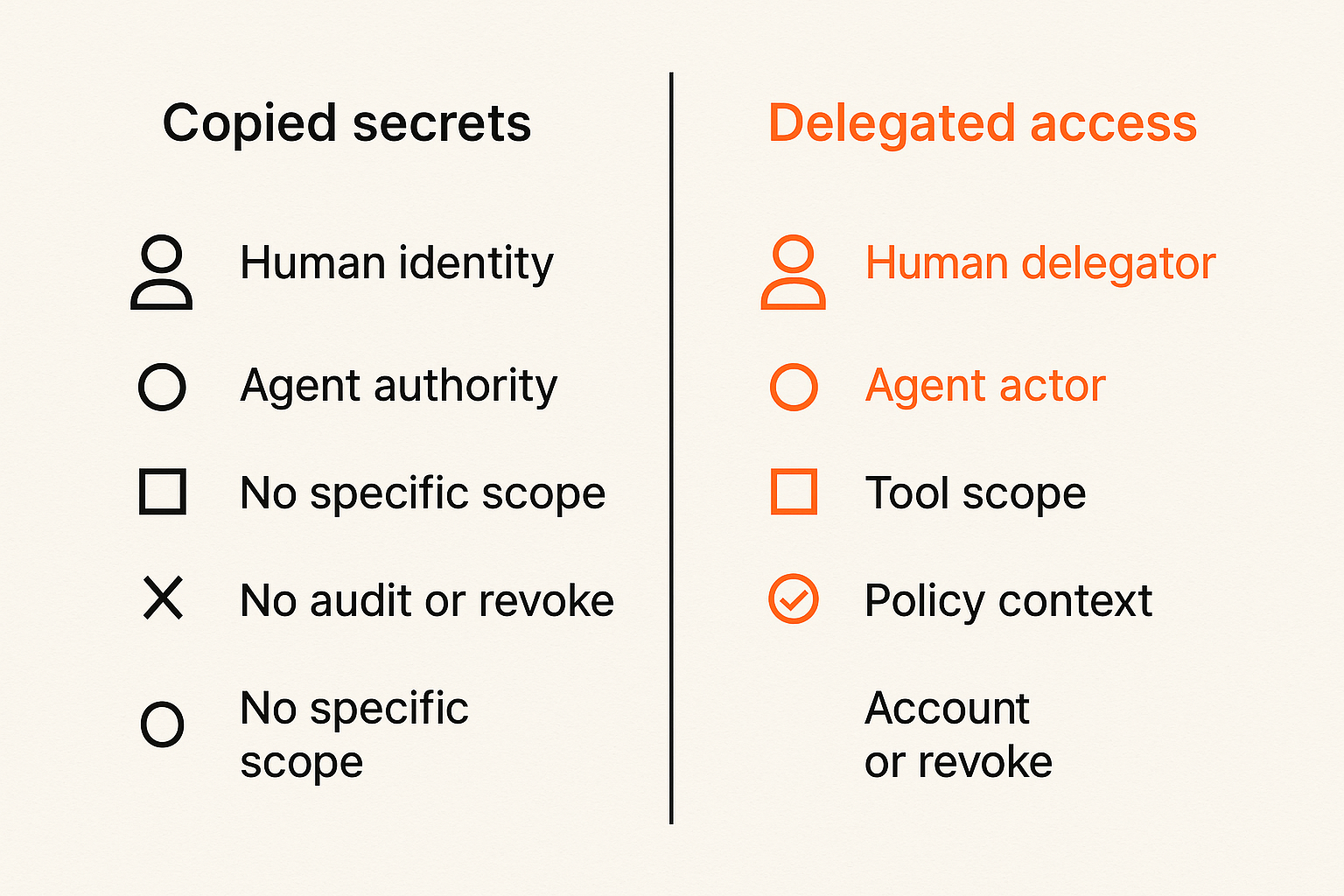
A human identity proves who is responsible. Agent authority defines what the system can do. These should be related but not collapsed.
If an agent uses a developer's full personal API key, the audit trail says the developer did the action. That might be technically true at the account layer, but operationally false. The action was performed by an agent runtime under a delegated workflow. Your architecture should preserve that distinction.
Better event and credential models include both:
- Human delegator: the person or organization granting authority.
- Agent actor: the runtime or workflow performing the action.
- Tool scope: the specific capability being used.
- Policy context: the approval, rule, or contract that allowed it.
Store secrets outside prompts and repos
Secrets do not belong in prompts, transcripts, repos, issue comments, or pasted setup docs. The reason is not only leakage. It is also lifecycle. A pasted secret has no clean owner, rotation path, or policy context.
Use the macOS Keychain, a team secrets manager, short-lived tokens, or delegated credential flows. For open source projects, assume contributors will use different local setups. Provide a contract, not a secret distribution habit.
A practical local pattern:
- Developer authenticates with the provider using normal human login.
- Tool requests a scoped token for a named agent workflow.
- Token is stored outside the repo.
- Agent runtime references the token by handle, not value.
- Tool calls emit events with credential handle and scope.
- Revocation removes the handle without rewriting prompts or code.
Audit who delegated what
Auditability starts when authority is granted, not when something goes wrong. If a tool can act on behalf of a user, the grant itself should be visible.
Track at least:
- Grant creator.
- Grant recipient or agent runtime.
- Scope.
- Expiration.
- Approval basis.
- Last used timestamp.
- Revocation status.
Practical rule: never let a local agent workflow depend on a credential that cannot be scoped, rotated, and explained.
Observability and audit trails on a Mac
Logs are not enough
Logs tell you what one component decided to write down. Agent workflows need correlated evidence across model calls, tool calls, credentials, approvals, and external systems.
A local terminal log is useful, but incomplete. A hosted API log is useful, but incomplete. An MCP server log is useful, but incomplete. The architecture improves when every important step shares a correlation ID.
For example:
{
  "correlation_id": "wf_2026_06_09_1042",
  "agent_id": "local-research-agent",
  "delegator_id": "user_123",
  "tool": "create_ticket",
  "tool_version": "1.4.2",
  "status": "success",
  "approval_ref": "policy_auto_low_risk",
  "timestamp": "2026-06-09T10:42:11Z"
}
The exact schema will vary. The principle does not.
Correlate local actions with remote systems
What breaks in practice is the gap between local success and remote truth. The agent says it created a ticket. The API returned 200. But the ticket is missing, duplicated, assigned to the wrong workspace, or created under the wrong account.
Correlate local action events with remote system events. If a local tool creates a hosted object, store the remote object ID. If a webhook confirms settlement, connect it back to the originating agent task. If a human approval was required, preserve the approval reference.
This matters especially when agents interact with payments, support queues, infrastructure changes, or customer records. The support burden is not caused by automation itself. It is caused by automation without traceability.
Make investigation cheap
The goal is not to collect infinite logs. The goal is to make common investigations cheap.
An engineer should be able to answer:
- Which agent workflow ran?
- Which model and tool versions were involved?
- Which credentials were used?
- Which external systems changed?
- Was the action approved, denied, retried, or rolled back?
If that takes three people and a screen share, your mac tools are not carrying their weight.
Testing agent workflows before they leave the laptop
Test plans should include tools not only prompts
Prompt evaluation is necessary but insufficient. Agents fail at boundaries: malformed tool arguments, stale schemas, missing permissions, rate limits, duplicate retries, webhook delays, and unexpected external state.
Your local test plan should include:
- Prompt behavior.
- Tool schema validation.
- Credential scope validation.
- External API fixtures.
- Retry and idempotency behavior.
- Approval paths.
- Event emission.
- Rollback or compensation.
Related reading from our network: independent operators face a smaller but similar quality-control problem when assembling AI tools for freelancers, where automation only helps if delivery stays inspectable.
Use fixtures for APIs and webhooks
Do not make every local agent test depend on live external APIs. Live tests are valuable, but they should be deliberate. For most development loops, use fixtures and recorded responses.
A useful fixture set includes:
- Successful response.
- Validation error.
- Authentication error.
- Rate limit.
- Timeout.
- Duplicate request.
- Delayed webhook.
- Partial success.
For webhooks, test both arrival and absence. Many systems behave correctly when the webhook arrives immediately and incorrectly when it arrives late, twice, or not at all.
Validate permissions and rollback
An agent that can do work must also handle denial. Permission errors should not be treated as unexpected exceptions. They are part of the workflow.
Test these cases locally:
- Agent lacks permission to read a resource.
- Agent can read but not mutate.
- Agent needs human approval.
- Approval expires.
- Action partially completes.
- Rollback succeeds.
- Rollback fails and escalation is required.
This is where mac tools should make it easy to simulate policy states, not just happy paths.
What breaks when mac tools are implemented badly
Tool sprawl creates invisible coupling
Tool sprawl is not just too many apps. It is too many hidden assumptions. One CLI sets an environment variable. Another background process injects credentials. A shell alias changes command behavior. A local MCP server depends on a file path that only exists on one machine.
The system still works, until someone new joins, a CI job runs, a token rotates, or a hosted runtime tries to reproduce the workflow.
The fix is not to ban personal tools. The fix is to define the shared contract. Engineers can customize around it, but the agent workflow should not depend on undocumented personal state.
Local success hides integration failure
Local workflows often succeed because they are accidentally privileged. The developer has admin access, broad tokens, local files, cached sessions, and open network paths. Production agents should not.
This gap creates a predictable pattern:
- Demo works on laptop.
- Staging fails with permission errors.
- Production workaround uses broader access.
- Audit trail becomes unclear.
- Support team inherits the ambiguity.
A better pattern is to test locally with production-like constraints. Use the same scopes, event requirements, and approval gates you expect in hosted environments.
Support becomes archaeology
When agent workflows are not designed for traceability, support becomes archaeology. Someone has to reconstruct intent from chat history, terminal scrollback, API logs, and memory.
That does not scale. It also creates trust problems. Users do not want to hear that an agent probably did something because a developer found a log line. They need a clear answer.
What works is boring: correlation IDs, structured events, scoped credentials, versioned tool contracts, and reproducible local runs.
A practical implementation sequence for platform teams
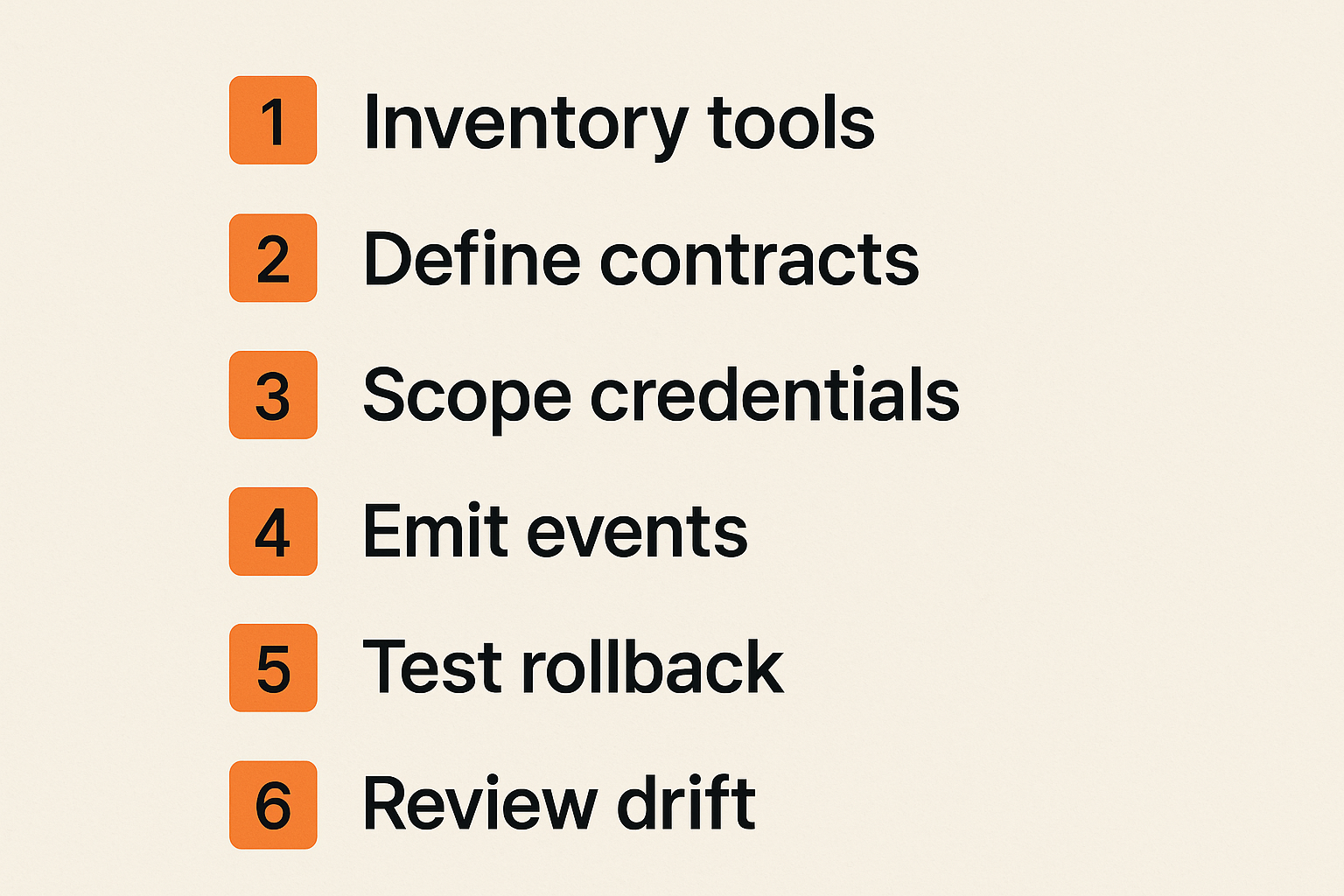
Step 1 inventory the workflow
Start with the actual workflow, not the tool list. Pick one agent task that matters: triaging issues, updating CRM records, generating invoices, reconciling API data, creating pull requests, or coordinating plugin calls.
Inventory the full path:
- Human starts or delegates the task.
- Agent receives context.
- Agent chooses tools.
- Tool obtains authority.
- External system is read or changed.
- Event is emitted.
- Result is shown, approved, retried, or escalated.
List every mac tool involved. Include the editor, CLI, local server, secrets store, browser, container, database, and logging tool. If it changes the workflow, it counts.
Step 2 define contracts
For each boundary, define a contract. Keep it small and explicit.
- Agent to tool: schema, validation, error model.
- Tool to credential provider: scope, expiration, revocation.
- Tool to external API: idempotency, retries, rate limits.
- Tool to event stream: event names, correlation IDs, redaction.
- Human to agent: approval, cancellation, escalation.
A lightweight contract is better than an elaborate document nobody follows. Store it near the code. Version it. Test it.
Step 3 automate the boring controls
Controls fail when they depend on memory. Automate the parts that should be consistent:
- Local environment bootstrap.
- Required tool version checks.
- Secret presence checks without printing values.
- Schema validation.
- Event linting.
- Fixture-based tests.
- Approval simulation.
- Cleanup of local state.
A bootstrap command should tell a developer what is missing and why. It should not silently create broad access just to make setup feel smooth.
Step 4 review drift monthly
Mac-based workflows drift. New tools appear. Old tokens remain. MCP server versions change. Background services accumulate. Test fixtures stop matching real APIs.
Run a monthly drift review for important agent workflows:
- Which tools changed?
- Which credentials are still active?
- Which scopes are broader than needed?
- Which events are missing fields?
- Which tests only pass locally?
- Which support incidents lacked evidence?
This is not ceremony. It is maintenance on the control plane your team already depends on.
Where logicsrc.com fits in an open agent toolchain
Use LogicSRC as a standards surface
LogicSRC is useful when teams need shared conventions for coordination between humans, agents, plugins, payment systems, credential flows, and hosted products. The point is not to replace every local tool. The point is to make the boundaries between tools more explicit.
The LogicSRC about page frames the project around open schemas, primitives, and conventions for coordination. That is the right level for this problem. Mac tools can remain flexible while the agent workflow uses common surfaces for identity, events, credentials, and coordination.
Connect identity coordination payments and events
Agent systems increasingly cross product boundaries. A hosted agent might coordinate with a plugin, request delegated access, initiate a paid action, emit an event, and ask a human for approval. Each step can be built separately, but the workflow needs shared meaning.
A standards surface helps platform teams define:
- Who is acting.
- Who delegated authority.
- Which system owns the state change.
- Which event proves the action happened.
- Which payment or settlement step is pending.
- Which credential can be revoked.
That does not eliminate product-specific code. It reduces the number of private assumptions buried inside it.
When to adopt and when not to
Adopt open coordination primitives when your agent workflow crosses identities, products, plugins, teams, or money movement. Adopt them when you need auditability, repeatability, and integration with other systems.
Do not overbuild if you are still sketching a private prototype with no external side effects. In that phase, a simple local setup is fine. But once the agent can mutate shared state, call real APIs, or act for another party, the architecture needs standards.
Closing checklist for mac tools in agent systems
What works
Good mac tools for agent builders do not just improve developer comfort. They make the workflow reproducible, bounded, and explainable.
What works:
- Treating the Mac as a development control plane.
- Using MCP as a stable tool boundary, not a script drawer.
- Separating human identity from agent authority.
- Keeping secrets out of prompts and repos.
- Emitting structured events for important actions.
- Testing permissions, retries, webhooks, and rollback.
- Reviewing drift in local workflows.
- Standardizing contracts while allowing personal productivity choices.
What fails
What fails is the opposite pattern: every engineer gets a clever setup, every tool gets broad credentials, every integration works only locally, and nobody can reconstruct what happened when an agent touches production-like systems.
The practical question is not whether your team has enough mac tools. It is whether those tools form an agent workflow architecture. If they do, your Mac becomes a reliable place to build, test, and explain agent behavior. If they do not, it becomes another source of hidden state.
In 2026, mac tools are part of the trust boundary for AI agent systems. Design them that way.
Try logicsrc.com
logicsrc.com is for developers and platform teams building interoperable AI agent systems, SDKs, plugins, and hosted products. If your mac tools need open standards for identity, coordination, credentials, events, and auditable workflows, Try logicsrc.com.