Vim Tools in 2026: Build Editor-Native Agent Workflows That Do Not Break in Production

Vim tools are becoming a serious integration surface for AI agent systems, not just a personal productivity preference. The pain shows up when an agent can edit code, call tools, open pull requests, modify config, or run terminal commands from inside an editor session, but the surrounding workflow has no reliable contract.
Teams think the problem is better autocomplete, faster refactors, or a more impressive chat panel. The real problem is operational control: what action was requested, by which actor, under which permission, against which workspace state, with which rollback path.
That changes the conversation. A vim plugin that lets an agent rewrite files is not only an editor extension. It is a runtime boundary between human intent, machine execution, code provenance, credentials, local processes, and hosted services.
The practical question is not whether developers like Vim. Many do, many do not, and many use Vim bindings inside other editors. The practical question is how platform teams should design vim tools so editor-native agents behave predictably across local machines, CI systems, remote dev environments, SDKs, and open standards like MCP.
Table of contents
- Vim tools are an architecture problem now
- What vim tools need to expose to agents
- Vim tools versus generic IDE plugins
- The runtime contract for editor-native actions
- A practical workflow for building vim tools
- MCP and open agent standards in Vim
- Security and trust boundaries for vim tools
- What breaks when vim tools are implemented badly
- What works in production
- Product fit for LogicSRC
- Closing architecture rules for vim tools
Vim tools are an architecture problem now

The editor is no longer a private island
For years, Vim was mostly a local operator environment. A developer opened files, ran commands, moved quickly, and maybe glued the editor to a language server or terminal multiplexer. If something went wrong, the blast radius was usually local: a bad edit, a failed build, a stash rescue, a forced reset.
AI agent workflows changed that boundary. A vim tool may now call a model, pass code context to a remote service, invoke a shell command, retrieve credentials, create an issue, generate a patch, or coordinate with a CI agent. The editor becomes a control plane for distributed work.
That means vim tools need to be designed like integration infrastructure. They need stable inputs, explicit state, permission checks, replayable events, and recovery paths. If they do not have those properties, they are just powerful macros with network access.
The mistake teams make is treating Vim as UI only
The mistake teams make is building a panel, command, or keybinding first, then trying to bolt reliability onto it later. That approach works for small personal plugins. It breaks when the plugin becomes part of a team workflow.
A keybinding is not a contract. A command name is not an audit trail. A text response from an agent is not a structured result. A successful file write is not proof that the requested task was completed safely.
A useful way to think about it is this: the Vim layer should be thin, but the workflow layer should be explicit. Vim should capture operator intent and expose editor context. The runtime should decide what can happen next, record the action, and return structured results the editor can render.
What changes when agents enter the editor
Agents introduce three practical pressures.
First, they operate across more context than a human command usually does. They inspect files, dependencies, test output, terminal history, issue text, and sometimes production telemetry.
Second, they can perform multiple steps quickly. A human may run one command and inspect the result. An agent may chain five operations before the user realizes the first assumption was wrong.
Third, they create accountability questions. If generated code introduced a regression, who approved the action? Which prompt, model, tool call, and workspace state produced the patch? Was a credential exposed? Was a policy bypassed?
Practical rule: treat every agent-capable vim tool as a workflow endpoint, not as an editor convenience.
Related reading from our network: teams building private communication products face similar boundary problems around metadata, devices, and retention in secure messaging apps. The domain is different, but the lesson is the same: the interface is the visible part, not the control system.
What vim tools need to expose to agents
Commands are not enough
Most editor integrations start with commands: refactor this function, explain this file, write a test, run this command, summarize diagnostics. Commands are useful, but too vague for reliable automation.
For agent workflows, a vim tool should expose actions with typed inputs and known outputs. For example, instead of a generic command called AgentFix, define an action like this:
{
  "action": "propose_patch",
  "workspace_id": "repo-frontend",
  "target_files": ["src/auth/session.ts"],
  "constraints": {
    "max_files_changed": 3,
    "run_tests": ["npm test -- session"],
    "requires_human_apply": true
  }
}
This does not remove the editor experience. The user can still trigger it with a Vim command. But the system now has something it can validate, log, replay, and reject.
State must be explicit
What breaks in practice is hidden state. The agent sees one buffer, the language server sees another, the terminal is in a different working directory, and the repository has uncommitted changes from a previous task. The plugin appears responsive, but the workflow is already ambiguous.
Vim tools should make state explicit at the action boundary:
- current buffer path and content hash
- visible selection or range
- workspace root
- git branch and dirty status
- relevant diagnostics
- terminal working directory, if terminal execution is involved
- user identity and agent identity
- policy mode, such as suggest-only or execute-with-approval
State capture is not glamour work. It is the difference between a useful tool and a support ticket generator.
Outputs need machine-readable structure
An agent response that says I fixed the issue is not enough. Vim tools need structured outputs that can be rendered for humans and processed by automation.
A useful result envelope might include:
{
  "status": "proposed",
  "changed_files": ["src/auth/session.ts", "src/auth/session.test.ts"],
  "diff_id": "diff_7f2a",
  "tests": [
    {"command": "npm test -- session", "status": "passed"}
  ],
  "requires_approval": true,
  "audit_event_id": "evt_91bd"
}
This lets Vim show a diff, CI consume test results, a hosted product display an approval task, and an audit system preserve causality.
Vim tools versus generic IDE plugins
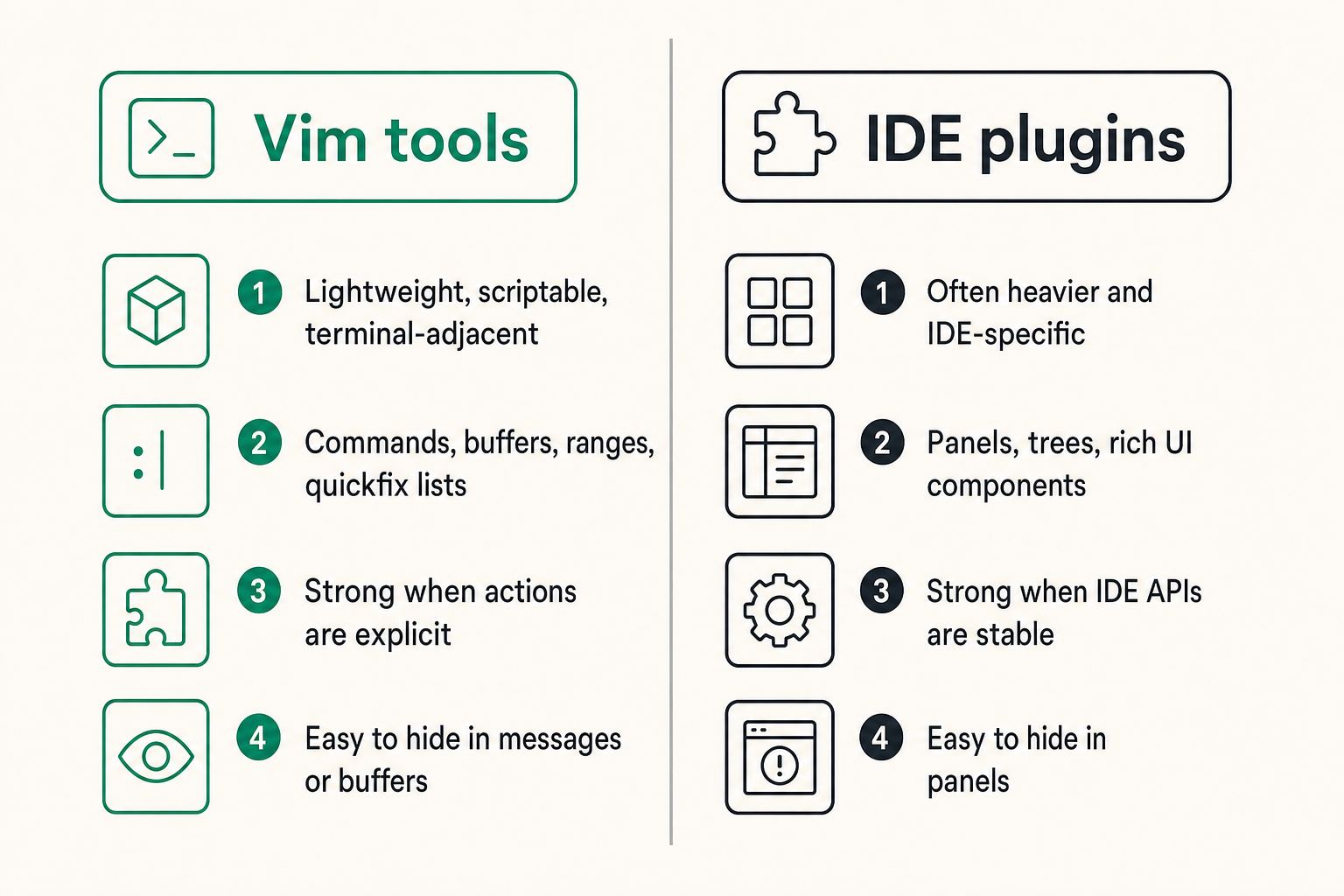
Comparison that matters for platform teams
The question is not whether Vim is better than a full IDE. The practical question is what integration model fits an agent system that must operate across local editors, remote containers, web consoles, and CI.
| Dimension | Vim tools | Generic IDE plugins | What platform teams should care about |
|---|---|---|---|
| Runtime shape | Lightweight, scriptable, terminal-adjacent | Often heavier and IDE-specific | Can the workflow run outside one client? |
| User interaction | Commands, buffers, ranges, quickfix lists | Panels, trees, rich UI components | Is intent captured consistently? |
| Automation fit | Strong when actions are explicit | Strong when IDE APIs are stable | Are actions portable across environments? |
| Failure visibility | Easy to hide in messages or buffers | Easy to hide in panels | Are errors structured and actionable? |
| Agent boundary | Must be designed deliberately | Often abstracted by extension framework | Is there a real permission and audit model? |
Vim tools are attractive because they are close to the operator's hands. They are also dangerous for the same reason. A command that feels like editing may actually mutate a repository, call external services, or execute shell commands.
Where Vim is strong
Vim is strong at composability. Buffers, ranges, command mode, quickfix lists, terminal panes, registers, and text objects create natural handles for agent actions. A developer can say, effectively, apply this to the selected function, explain diagnostics in this quickfix list, or generate tests for this buffer.
Vim is also strong in constrained environments. Remote hosts, SSH sessions, containers, and minimal dev shells often support Vim workflows before they support a full graphical IDE. That matters for platform teams building hosted dev products or infrastructure tools.
Finally, Vim has a culture of explicit operator control. Good vim tools should preserve that. The agent can propose, stage, and explain. The human should still have clear controls for approve, reject, inspect, and rollback.
Where Vim fails without contracts
Vim fails when plugins treat text as the only source of truth. Editor buffers are important, but agent systems need more than text. They need workspace identity, tool permissions, credential boundaries, dependency state, and event history.
Vim also fails when every integration invents its own model. One plugin calls an agent directly. Another shells out to a CLI. Another talks to a hosted API. Another uses MCP. Each has different auth, logging, config, and approval behavior. The result is not a developer experience. It is a pile of partially trusted side channels.
Practical rule: do not let the editor plugin become the system of record. Let it be the operator surface for a workflow that can be inspected elsewhere.
For adjacent reading, independent workers adopting AI tools face a similar shift from isolated tools to operating models; see the future of freelancing with AI for a non-platform version of the same workflow problem.
The runtime contract for editor-native actions
Define action schemas before UI
If you start with UI, every command becomes special. If you start with action schemas, the UI becomes a renderer over a stable workflow. That is the better foundation for vim tools.
An action schema should define:
- action name and version
- required inputs
- optional constraints
- permission scope
- expected outputs
- error categories
- event emission rules
- approval requirements
This is the same architectural direction discussed in LogicSRC's prior post on icon tools as runtime contracts for agent actions. The visual or editor-facing trigger is not the important part. The important part is the runtime agreement behind the action.
Separate intent from execution
Intent is what the operator wants. Execution is what the system does. Mixing them creates confusing workflows.
For example, :AgentFixBug is ambiguous. Does it inspect diagnostics? Modify files? Run tests? Commit changes? Open a pull request? Ask first? Use production logs? Each step has a different trust boundary.
A better design separates the flow:
- capture intent from the editor context
- create a proposed action envelope
- evaluate policy and permissions
- run allowed tools in a controlled runtime
- return a structured result
- ask for approval before applying risky changes
- emit audit events
This separation also makes it easier to support multiple clients. Vim, a web IDE, a CLI, and CI can all submit similar action envelopes.
Make permissions boring and reviewable
Permissions should be boring. If a user cannot understand what an agent is allowed to do, the permission model will be bypassed, ignored, or replaced with an all-powerful token.
Useful scopes for vim tools include:
- read current buffer
- read selected files
- read repository metadata
- propose diff
- apply diff
- run allowlisted command
- create branch
- open pull request
- access external issue tracker
- request credential exchange
Avoid vague scopes like workspace access or developer mode. They are convenient until an incident review asks what the agent could actually do.
A practical workflow for building vim tools
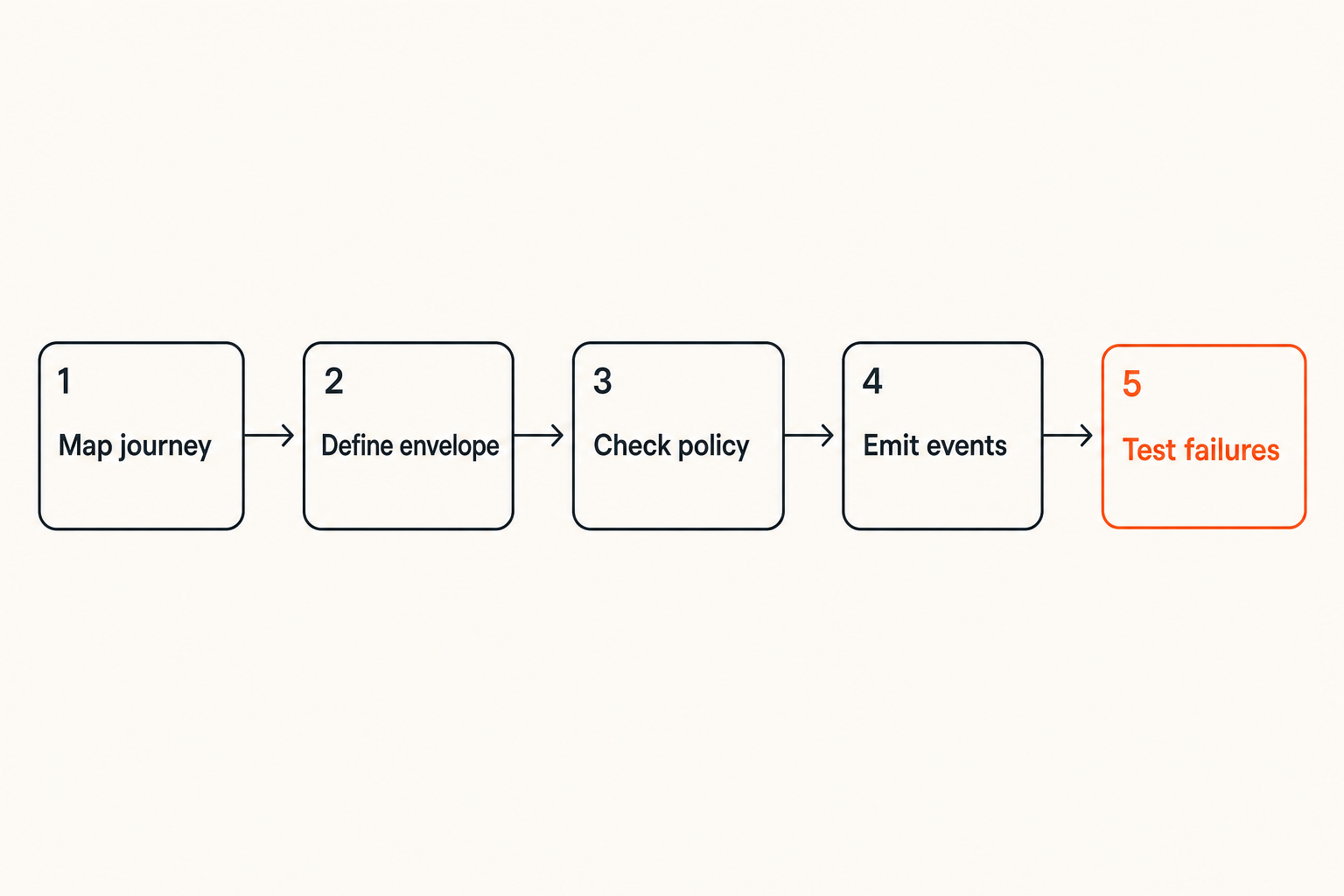
Step 1 map the operator journey
Start with the operator journey, not the plugin menu. Pick one workflow where Vim is the natural place to start. Good candidates include test generation, diagnostics explanation, small refactors, dependency upgrade review, secure secret scanning, documentation updates, or pull request preparation.
Write the journey as a sequence of decisions:
- The developer selects a range, buffer, or diagnostic.
- The tool captures workspace state.
- The agent proposes a plan.
- The developer approves or edits the plan.
- The tool runs bounded actions.
- The developer reviews the diff and test output.
- The system emits an audit event and preserves the result.
The point is to find where human judgment is required. Do not automate those points away too early.
Step 2 define the action envelope
Once the journey is clear, define the envelope your vim tool will send to the runtime.
{
  "type": "agent_action.requested",
  "action": "generate_tests",
  "actor": {
    "human_user_id": "usr_123",
    "agent_id": "agent_test_writer"
  },
  "context": {
    "editor": "vim",
    "workspace_id": "payments-api",
    "buffer_path": "src/refunds.ts",
    "selection": {"start_line": 42, "end_line": 88},
    "git_commit": "9b31c4a"
  },
  "constraints": {
    "write_mode": "propose_only",
    "max_new_files": 2,
    "allowed_commands": ["npm test -- refunds"]
  }
}
This envelope is more important than the keybinding. The keybinding can change. The envelope is what other systems can trust.
Step 3 wire events and audit trails
Every meaningful state transition should produce an event. Not because events are fashionable, but because agent workflows need causality.
At minimum, emit events for:
- action requested
- permission evaluated
- tool invoked
- file diff proposed
- command executed
- approval granted or denied
- change applied
- workflow failed or cancelled
These events do not need to be noisy in the editor. Vim can show the simple version. The platform should preserve the full version.
Step 4 test degraded modes
Most plugin demos assume perfect state: clean repo, valid token, online service, fast model, passing tests. Production usage does not look like that.
Test degraded modes deliberately:
- model timeout
- partial response
- dirty git tree
- conflicting file edit
- denied permission
- missing credential
- failing test command
- unavailable MCP server
- offline mode
The workflow should fail closed where risk is high and fail soft where convenience is acceptable. For example, explanation can degrade to local-only context. File mutation should not proceed after permission ambiguity.
Practical rule: if a vim tool cannot explain what it did after a failure, it should not be allowed to mutate the workspace before the failure.
MCP and open agent standards in Vim
Use MCP as a tool boundary, not a magic layer
MCP is useful because it gives agents a structured way to discover and call tools. But MCP does not automatically solve ownership, approval, identity, or audit. Those still need to be designed.
For vim tools, MCP works best when it sits behind the editor plugin as a capability layer. Vim captures context. The runtime maps context into MCP tool calls. The MCP server exposes bounded operations. The result comes back as structured output.
The bad pattern is letting the plugin call arbitrary MCP tools with broad workspace access and no policy layer. That recreates the same problem with a nicer protocol.
Normalize identities across local and hosted contexts
Identity gets messy quickly. There is the human developer, the local editor session, the agent, the model provider, the MCP server, the hosted product, and sometimes a bot account in GitHub or GitLab.
A production-grade vim tool should not collapse all of that into one API key. It should preserve identity across the workflow.
At minimum, track:
- human actor
- agent actor
- organization or workspace
- local session identifier
- tool server identity
- delegated credential scope
- approval actor, if different from requester
LogicSRC covers this broader coordination problem as part of its work on open primitives for humans, agents, plugins, payments, events, and hosted products; the LogicSRC about page is the clearest overview of that surface.
Avoid one-plugin-per-agent sprawl
In production, sprawl is one of the first things that breaks. One team installs a code review agent. Another installs a test generation agent. Security installs a secret scanning plugin. Platform installs an internal MCP bridge. Each plugin has its own config, logs, permissions, and credentials.
The operator now has five ways to ask an agent to touch code, and platform has no single place to answer basic questions.
A better model is one vim tools host with multiple registered actions. Agents and MCP servers can vary behind the boundary, but the editor integration should present consistent controls, consistent eventing, and consistent approval semantics.
Security and trust boundaries for vim tools
Local execution is still execution
There is a common misconception that local editor automation is safer because it happens on the developer machine. Sometimes it is safer. Often it is just less observable.
A vim tool that runs npm install, edits shell profiles, modifies infrastructure code, reads environment variables, or opens browser sessions is operating inside a sensitive trust zone. The fact that the action began in a familiar editor does not reduce the risk.
Treat local execution with the same seriousness as hosted execution:
- allowlist commands by workflow
- capture command output and exit status
- avoid shell interpolation where possible
- require approval for destructive commands
- block secret-shaped output from model prompts
- record local execution events without leaking private data
Credentials should not live in buffers
Credentials are especially dangerous in editor workflows because buffers, registers, swap files, logs, prompts, and model context can accidentally preserve sensitive values.
Do not ask users to paste tokens into Vim. Do not pass raw secrets into prompts. Do not store credentials in plugin config when a system keychain, local broker, or delegated credential flow is available.
For agent systems that need to coordinate temporary access between users, plugins, and hosted products, LogicSRC's work on credential sharing is directly relevant because the boundary should be explicit instead of hidden in editor state.
Approval flows need context
Approval prompts fail when they are too generic. A modal that says Allow agent to edit files? teaches users to click yes. It does not help them reason about risk.
A useful approval in Vim should show:
- action name
- target files
- proposed diff summary
- commands to be run
- external systems touched
- credential scopes requested
- rollback path
- audit event reference
This is where editor-native UX matters. Vim can show a quick summary, a diff buffer, command output, and an approval command without pretending to be a full web app.
What breaks when vim tools are implemented badly
Silent file mutation
Silent file mutation is the fastest way to lose trust. If an agent changes files without a clear proposed diff, users will either stop using the tool or start treating every generated change as suspicious.
The fix is simple but often skipped: default to propose-only. Let the agent generate a patch. Render it as a diff. Require an explicit apply action. Record who approved it.
For low-risk workflows, teams can relax this later. But starting with silent apply is backwards.
Unbounded terminal commands
Terminal access is powerful because it lets agents test, inspect, and automate. It is risky because shell commands are an open-ended interface to the machine.
What fails in practice is vague permission like allow terminal. That grants too much. Instead, bind command execution to the action schema.
Example policy:
actions:
  generate_tests:
    allowed_commands:
      - "npm test -- *"
      - "pnpm test *"
    denied_patterns:
      - "rm -rf"
      - "curl * | sh"
      - "sudo *"
    requires_approval:
      - command_not_allowlisted
      - writes_outside_workspace
This is not perfect security, but it is a practical control. Combine it with process isolation where possible.
Lost causality across tools
Lost causality is subtle. The user asks Vim to fix a failing test. The plugin calls an agent. The agent calls an MCP server. The MCP server reads issue context. Another tool runs tests. A patch appears. Later, nobody can reconstruct why the patch was made.
That is not acceptable for serious teams.
Preserve causality with correlation IDs. Every action envelope, MCP call, command execution, approval, diff, and final result should share a workflow identifier. This is basic distributed systems hygiene applied to editor tools.
Related reading from our network: finance teams buying workflow software run into the same ownership and approval problems, even without agents; the practical guide to budgeting software workflows is a useful adjacent comparison.
What works in production
Small deterministic actions
The vim tools that survive production use tend to do small things well. They do not claim to replace engineering judgment. They reduce friction around bounded tasks.
Good examples:
- explain a diagnostic with local code context
- generate a test skeleton for a selected function
- propose a small refactor within one file
- summarize a diff before commit
- detect likely secret exposure before save
- prepare a pull request description from commits and issue text
Bad examples usually sound more impressive: upgrade this service, fix all security issues, make this module production-ready. Those may become workflows eventually, but they should be decomposed into smaller actions.
Evented workflows instead of hidden side effects
What works is evented workflow design. Every important step becomes visible to the platform, even if the Vim UI remains minimal.
A simple event stream might look like:
evt_001 action.requested generate_tests
evt_002 permission.allowed propose_diff
evt_003 tool.called read_buffer
evt_004 tool.called create_patch
evt_005 diff.proposed diff_44a
evt_006 approval.granted usr_123
evt_007 command.executed npm test -- refunds
evt_008 action.completed
This gives support teams, security reviewers, and platform owners something concrete to inspect. It also lets hosted products display workflow state without scraping editor logs.
Human-readable diffs and machine-readable logs
Developers need diffs. Systems need logs. Do not choose one.
A good vim tool gives the human a clean diff buffer, test output, and approval command. It gives the platform structured records with IDs, timestamps, actor identities, tool calls, and result states.
This dual output is the pattern to preserve. If everything is optimized for humans, automation cannot reason about it. If everything is optimized for machines, developers will work around it.
Practical rule: every agent action should produce one artifact for the operator and one artifact for the system of record.
Product fit for LogicSRC
Vim tools as coordination surfaces
For LogicSRC, vim tools are not interesting because Vim is old, fast, or beloved by power users. They are interesting because they expose a hard coordination problem in a compact form.
A developer in Vim may need an agent, an MCP tool, a credential grant, a payment-triggered entitlement, an event stream, a hosted approval screen, and an audit trail. Those pieces should not be glued together with ad hoc plugin state.
The editor should be one participant in a broader coordination model. That is the architectural fit.
Where LogicSRC belongs in the stack
LogicSRC is not trying to replace Vim, MCP, SDKs, or hosted products. The useful layer is the open standards surface between them: identities, action envelopes, events, permissions, credential exchange, workflow states, and audit conventions.
In a vim tools architecture, LogicSRC-style primitives can help define:
- how a human and agent are represented in the same workflow
- how an editor action becomes a portable action envelope
- how MCP tool calls are correlated with approvals and results
- how credentials are requested without exposing secrets in buffers
- how hosted products receive auditable workflow events
- how multiple agents coordinate without inventing incompatible schemas
That is not a flashy plugin feature. It is the boring interface that keeps the feature usable as teams scale.
A useful adoption path
Do not start by standardizing everything. Start with one high-value workflow and make it auditable.
A practical adoption path looks like this:
- Choose one vim tool workflow, such as propose tests for selected code.
- Define the action schema and output envelope.
- Add explicit actor identity and workspace state.
- Restrict write and terminal permissions.
- Emit workflow events with correlation IDs.
- Render diffs and approvals inside Vim.
- Connect the same events to a hosted review or audit surface.
- Only then add more agents or MCP servers.
This avoids the architecture astronaut version of open standards. Standards should fall out of repeated workflow boundaries, not slide decks.
Closing architecture rules for vim tools
Prefer contracts over cleverness
Clever vim tools are easy to demo. Reliable vim tools are harder because they need contracts. The contract is what makes an agent action portable, reviewable, and safe enough for team use.
The best designs keep Vim sharp as an operator surface while moving policy, execution, state, and audit into explicit workflow layers. That separation is what lets the same action work from Vim today, a hosted workspace tomorrow, and a CI agent next quarter.
Design for the audit you will eventually need
If vim tools can modify code, run commands, touch credentials, or coordinate agents, assume someone will eventually ask what happened. Design so the answer is available.
Capture intent. Preserve state. Bound execution. Require contextual approvals. Emit events. Keep human-readable diffs and machine-readable logs. Use MCP and open standards where they clarify boundaries, not where they hide them.
Vim tools in 2026 should not be treated as clever editor toys. They are workflow endpoints for agentic software development. Build them that way, and the editor becomes a reliable coordination surface instead of another disconnected automation channel.
Try logicsrc.com
You are writing for developers and platform teams building interoperable AI agent systems, SDKs, plugins, and hosted products. Try logicsrc.com